
Log pusher to s3
:::(Warning) (This article has been deprecated.)
Please see the new article, Log Shipping.
:::
Delivery Log (DL) files contain multiple log lines, each representing an HTTP transaction. These files can be used for auditing or debugging purposes and are collected across the entire Qwilt deployment.
The Log Pusher to S3 automatically sends the log files to service providers and content providers who are enrolled in a log delivery service for their service or deployment.
To enroll, contact support@qwilt.com.
This document provides step-by-step Log Pusher to S3 setup instructions, and a detailed description of the Delivery Log format.
Setup
To set up the Log Pusher to S3, configure an AWS IAM Role to enable Qwilt to push DL files to your Amazon S3 bucket, and then share the Role ARN value with Qwilt.
The following procedure provides step-by-step instructions on how to do this.
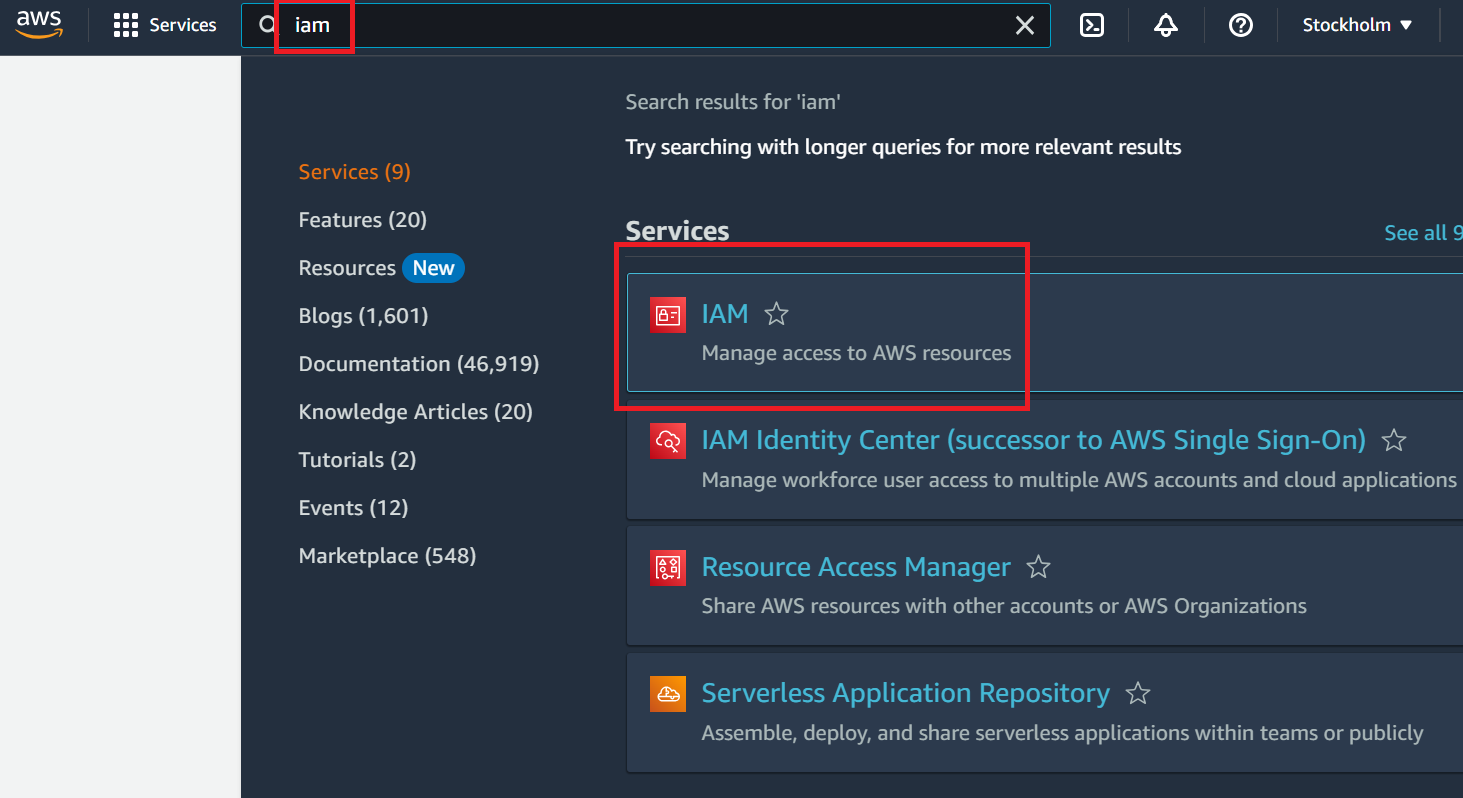
1. Log in to your AWS account. Choose All services and search for IAM. Open IAM.
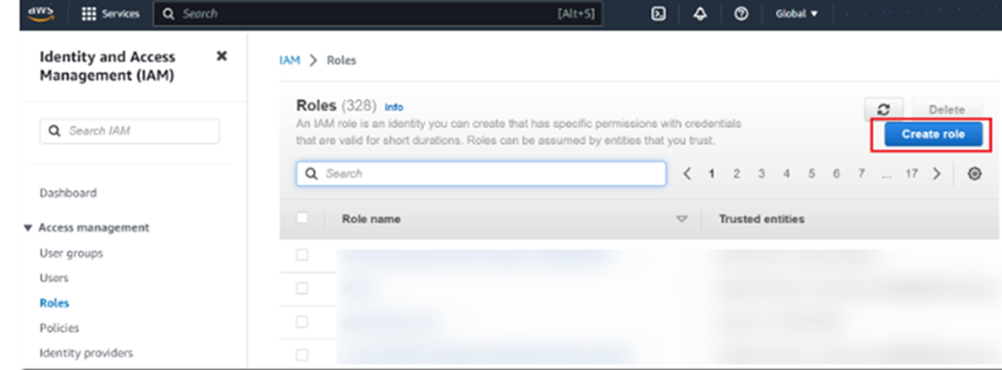
- In IAM, open the Roles page. Select Create role.
- Under Trusted entity type, select Custom trust Policy. In the Custom trust policy field, paste the Trusted Policy you received from Qwilt.
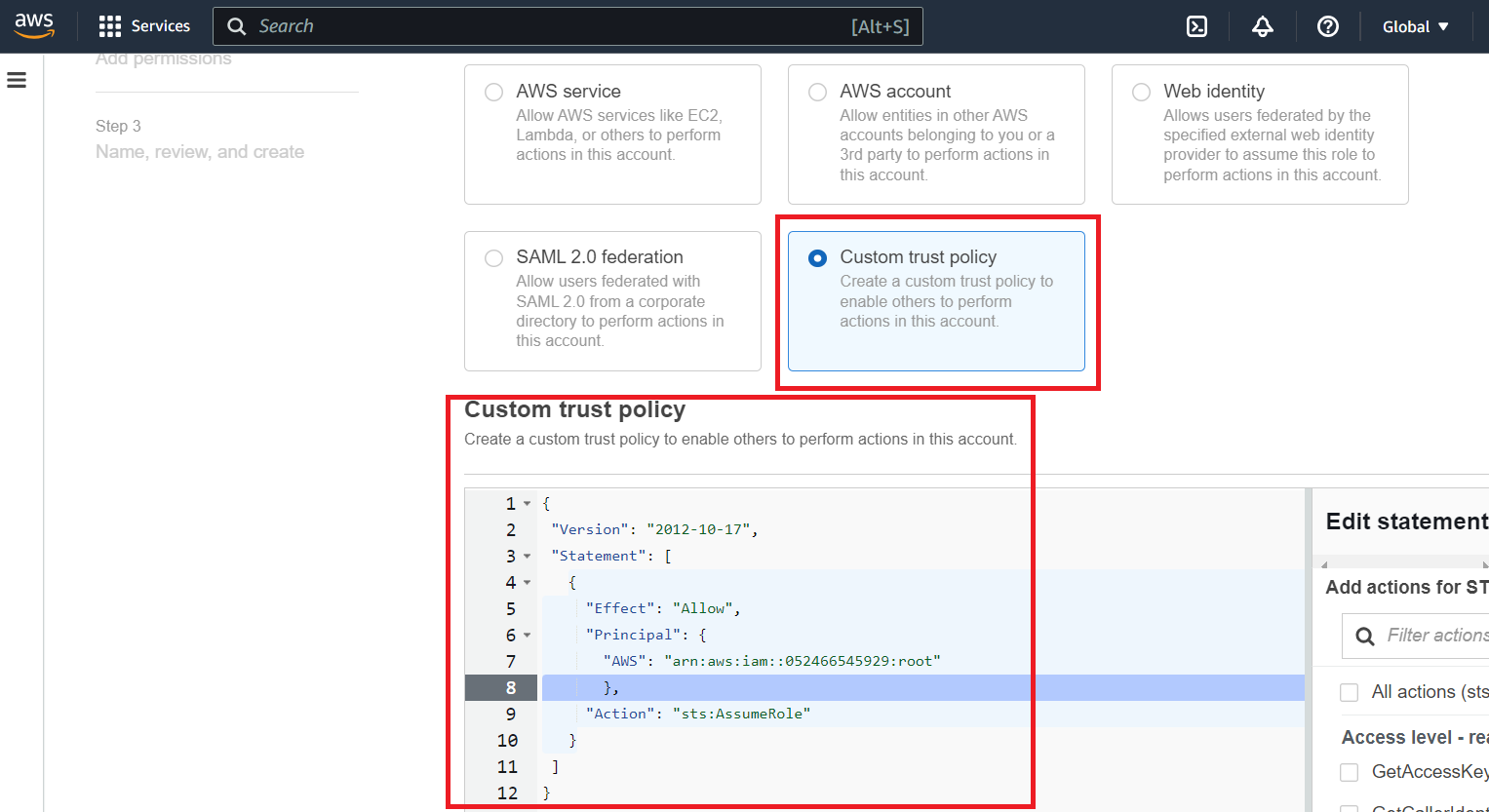
Example:
{
 "Version": "2012-10-17",
 "Statement": [
   {
     "Effect": "Allow",
     "Principal": {
       "AWS": "arn:aws:iam::052466545929:root"
       },
     "Action": "sts:AssumeRole"
   }
 ]
}
Click Next.
- On the Add Permissions page, click Next without defining anything. On the Name, review, and create page, enter a Role name and then select Create role.
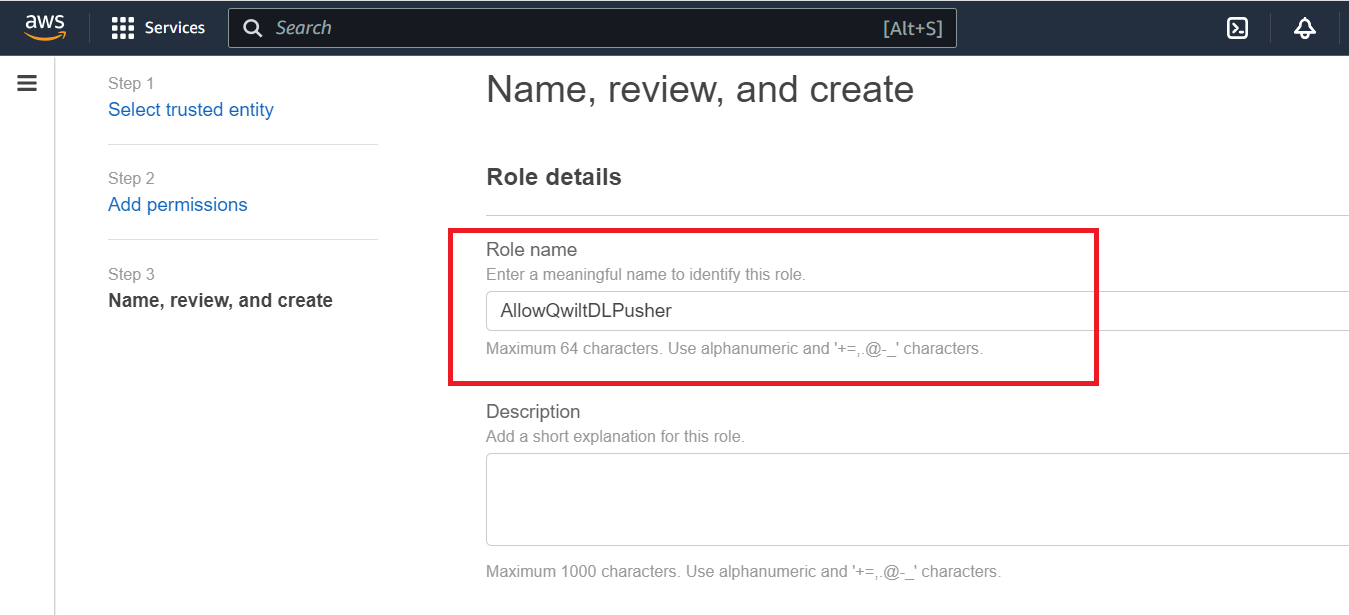
-
In the IAM Roles page, search for the new role you created and open it.
-
In the Permissions tab, select Add permissions, and then from the drop-down menu, select Create Inline Policy.
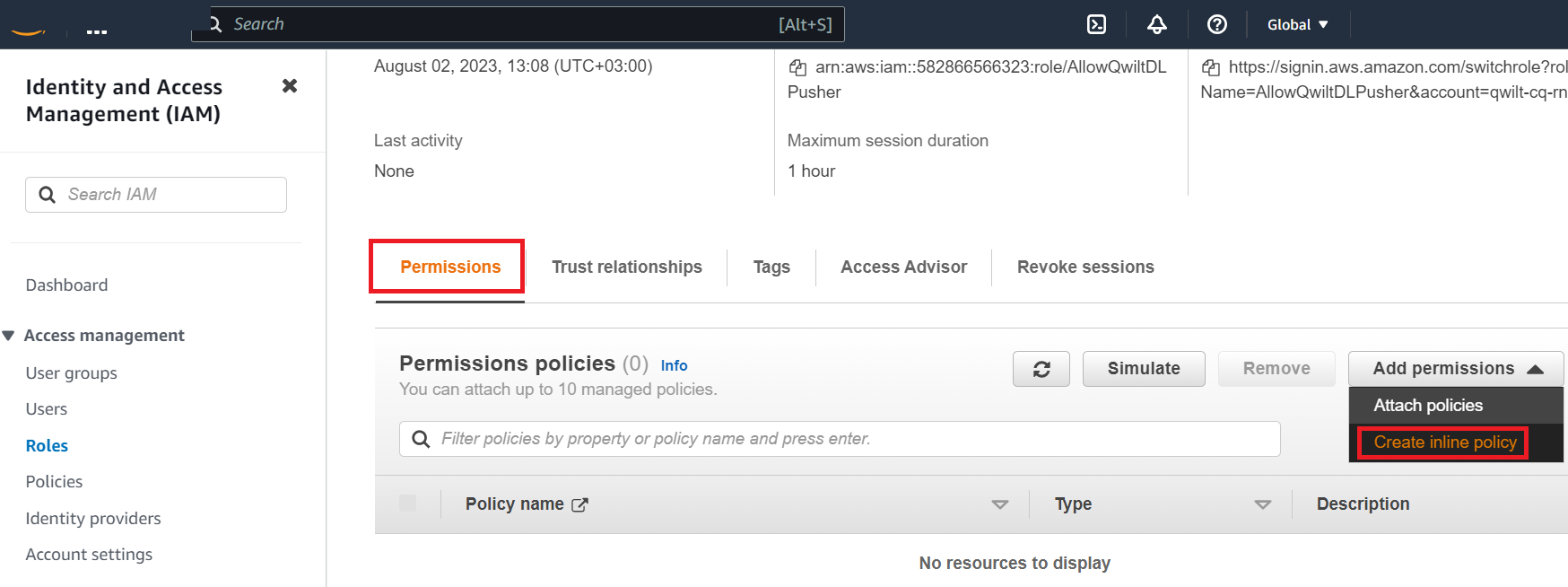
- In the Specify permissions page, click the JSON button. In the Policy editor, enable the following actions:
“putObject”
“putObjectAcl”
We recommend specifying these actions as well, to facilitate troubleshooting if/when needed:
“getObject”
"getObjectAcl"
“listBucket”
Define as Resources the Arn of the S3 bucket you want to share with Qwilt (e.g., "arn:aws:s3:::qwilt_logs"), and specify all objects (e.g., "arn:aws:s3:::qwiltlogs/").
Example:
{
    "Version": "2012-10-17",
    "Statement": [
        {           "Effect":
"Allow",
            "Action": [
                "s3:PutObject",
                "s3:GetObjectAcl",
                "s3:GetObject",
                "s3:ListBucket",
                "s3:PutObjectAcl"
            ],
            "Resource": [
                "arn:aws:s3:::qwilt_logs",
"arn:aws:s3:::qwilt_logs/*"
            ]
        }
    ]
}
- Click Next.
- Review the policy. Add a name to the policy that makes sense, and then select Create Policy.
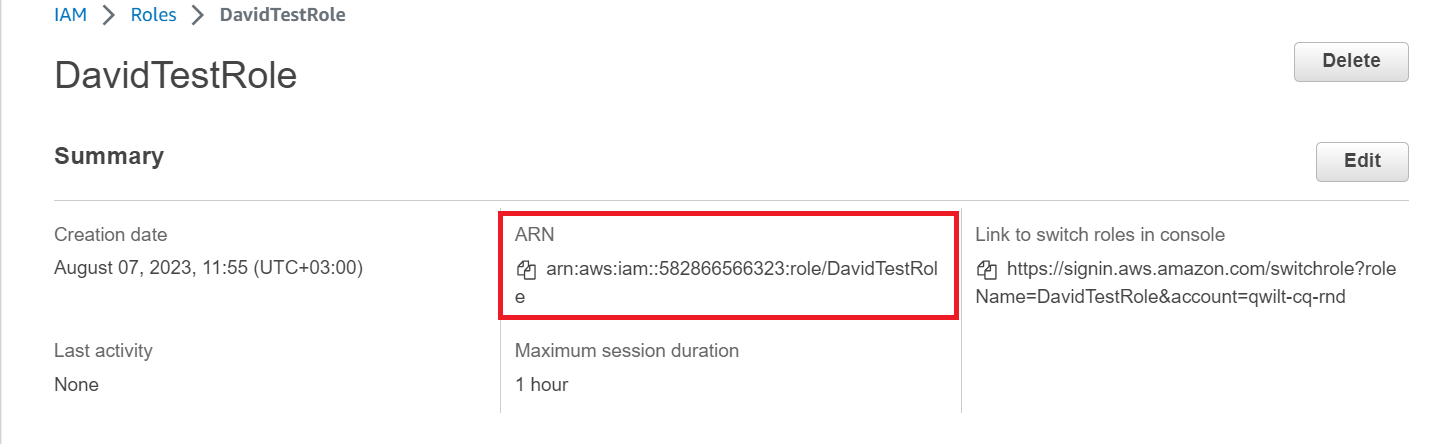
- In the Role page, under Summary, the Role ARN is displayed.
This ARN value needs to be shared with Qwilt in order to complete the setup.
Copy the value and share it with Qwilt, via a secure method of your choice.
Delivery Log File
A Delivery Log (DL) file is created every five minutes, or as soon as the log contains 50MB of data - whichever comes first. The Delivery Log can be a TSV (tab-separated values) or JSON file, compressed in gzip format.
DL files are pushed as soon as they are created; however, in the event of heavy traffic or communication issues, they may arrive up to 24 hours later.
The DL file naming convention is as follows:
<file start timestamp(YYYYMMDD-HHmmSS)>.<service-name>.<unique Id>.log.gz
For example:
20230801-055130.example-service.03495.log.gz
Delivery Log Format
Note: The log file format described in this document may differ for customers who implemented the Log Pusher before August 2023.
Each line of the DL file represents an HTTP transaction.
Each line is a collection of tab-separated values, presented in a fixed order.
The following is an example log line, in TSV format:
13-04-23 18:17:02.883 1681409822883 52 dynamic-cdn-extention c7081-acme-live $0:1$7PLOwpcQM7p789G4pWAw3+KvaPA= 49222 211.94.171.32 443 853222 https://g008-q-prd-qw.cdn.qwilt.com/Content/url-2/Live/xyz/Segment-2930.mp4 200 - - Mozilla/5.0 (iPhone; CPU iPhone OS 16_6 like Mac OS X) AppleWebKit/605.1.15 (KHTML, like Gecko) Version/16.5 Mobile/15E148 Safari/604.1 accepted - - GET 853393 1.1 external origin-qwilt.video 200 miss
The following table describes each of the parameters, in the order in which they appear in the log line. Note that when a parameter value is not available, a hyphen (-) appears instead.
These are the default fields that are delivered. For a different set of fields, contact Qwilt Support at support@qwilt.com.
| Field | Description | Data Type | Example Value/s |
|---|---|---|---|
| startTime | Unixtime of the record creation time. Date and time. | Two strings separated by a space. | 13-04-23 18:17:02.883 |
| startTimeEpochMilli | The record creation time. The amount of milliseconds since the epoch. | Integer | 1681409822883 |
| durationMilli | The time elapsed from the arrival of the packet containing the first byte of payload to the arrival of the packet containing the last byte of payload. | Integer | 52 |
| source | Indicates the source of the response. Valid Values: dynamic-cdn-extension - The content was provided by an origin server. cache-delivery - The content was provided by the Qwilt CDN cache. self-generated - The response was generated by the Qwilt CDN cache. This value only applies to HTTP error responses (the error code in the "httpResponseCode" field).) |
String | dynamic-cdn-extention |
| siteName | An internal ID assigned by Qwilt to your site. | String | c7081-acme-live |
| clientIp | Client side IP. If IP is obfuscated, the log will include the obfuscated value of the client IP. | String: IPv4 or IPv6 address | $0:1$7PLOwpcQM7p789G4pWAw3+KvaPA= (This is an example of an obfuscated IP.) |
| clientPort | The client-side TCP port. | Integer | 49222 |
| serverIp | The upstream server IP that the CDN connected to (assuming a connection). This can be the origin, or a peer/parent OCN. In case of multiple attempts, it will hold the latter. | String: IPv4 or IPv6 address | 211.94.171.32 |
| serverPort | The server-side TCP port. | Integer | 443 |
| sentBytes | The number of L7 bytes transferred from the server side since the transaction began (including both content and HTTP response headers). | Integer | 853222 |
| uri | The URI of the client request. | String | https://g008-q-prd-qw.cdn.qwilt.com/Content/url-2/Live/xyz/Segment-2930.mp4 |
| httpResponseCode | The HTTP response code value. When no response is available, for example, if the connection is interrupted, this field value is ‘-’. | Integer | 200 |
| requestRange | The HTTP Range, if one was specified in the request. | String | bytes=795346685-795548657 |
| responseRange | The HTTP Content Range, if present in the response. | String | bytes 795346685-795548657/986715125 |
| userAgent | The User-Agent, if the user-agent header was included in the request. | String | Mozilla/5.0 (iPhone; CPU iPhone OS 16_6 like Mac OS X) AppleWebKit/605.1.15 (KHTML, like Gecko) Version/16.5 Mobile/15E148 Safari/604.1 |
| trxStatus | Valid values: accepted - the transaction was served. rejected - the transaction was rejected. The “trxStatusReason” value explains why. |
String | accepted |
| trxStatusReason | Provides more details about the transaction status. Valid values: ‘-’ when the transaction was accepted. physical-capacity-exceeded - The transaction was rejected because the link capacity was reached. efficiency-policy - Transaction was rejected because resources are dedicated to prioritized transactions. set-limit-exceeded - Transaction was rejected because a configured global limit was reached. |
String | physical-capacity-exceeded |
| referer | The Referer HTTP request header value, if this header was included in the request. | String | https://www.geeksforgeeks.org/ |
| httpMethod | The HTTP method used in the transaction. Valid values: GET HEAD OPTIONS ‘-’ for any other method. |
String | Get |
| fetchedBytes | The size of the HTTP content payload plus response headers for the upstream transaction, if there was one. When 'source' is ‘cache-delivery', this value is ‘0.’ | String | 853393 |
| httpVersion | The HTTP version. | String | 1.1 |
| trigger | For transactions served by the CDN cache, indicates if the transaction was initiated by an external client or by the CDN. Valid Values: external - An external client initiated the transaction. cdn - The CDN triggered the transaction. |
String | external |
| originHostNames | This field is relevant when the ‘source’ is 'dynamic-cdn-extension.' A comma-separated list of the origin servers contacted by the CDN while handling the transaction. For other ‘source’ types, the ‘originHostNames’ value is ‘-’. | String | origin1.com,origin2.com,origin3.com In this example, we can see that origin1.com was contacted first, and then origin2.com was contacted, and then origin3.com was contacted. |
| originHttpResponseCodes | This field is relevant when the ‘source’ is 'dynamic-cdn-extension.' For other ‘source’ types, the ‘originHttpCodes’ value is ‘-’. A comma-separated list of the response codes received from each of the origins listed in the ‘originHostNames’ field. If the communication with the origin did not reach the point where a response code was sent, or if an invalid response is sent, the value is ‘-’. | String | 503,-,200 (In this example, taken together with the example values for originHostNames, we can see that origin1.com responded with 503, origin2.com did not respond, and origin3.com responded with 200). |
| CacheStatus | Describes how the transaction was handled by the cache. Valid Values: hit: The content was served from the local cache. miss: The content was served from the origin server, because it was not available in the cache. bypass: The content was served from the origin server, even though it was available in the cache, due to configuration or specific request info. expired: The content was served from the origin server, because the content in the cache was stale. stale: Stale content was served from the local cache. For example, if the origin server is unavailable and the configuration rules enable serving stale content when the origin server is unavailable. updating: Stale content was served from the local cache, while a background request was sent to the origin server to update it. revalidated: Stale content was revalidated against the origin server and served from the local cache, as it was still up-to-date. ‘-’ If the transaction cannot be classified as one of the above. For example in case of an error or an unusual condition. |
String | hit |