
Add a path
Use paths to define custom configuration parameters for selected content.
To add a path:
- Navigate to the My Media Sites page and select the site.
- On the Media Site Configuration tab, scroll to the Hosts area and select the host.
-
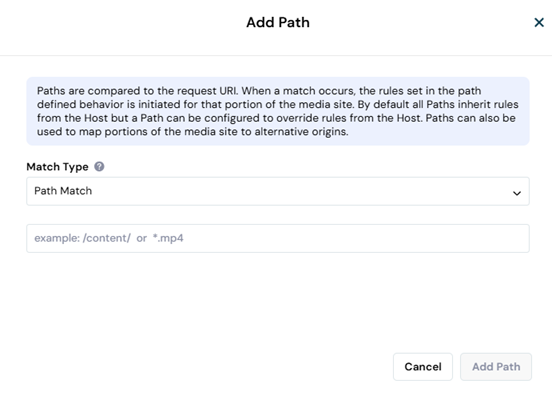
In the Path Rules area, select Add Path.
-
Select the Match Type.
- Path Match - The default match type.
- Path Regex - Supports using a regex expression to define the match conditions.
-
Define the path pattern or regex.
Notes about Path Regex:
* Path Regex defines a path search.
* Non-capturing groups are supported. Capture groups are not supported.
* Regex wildcards such as(?:and+are supported.
For example:
\.(?:ts|mp4)$specifies any file that ends with .ts or .mp4.
/[0-9]+\.mp4specifies any filename that is comprised of numeric characters and ends with .mp4.
* Add the start (^) and end (\$) anchors to define an exact match for a specified string. (The string itself can include wildcards.)
For example:
While/file/.*\.mp4could match both/any/path/file/<any string>.mp4and/file/<any string>.mp4
^/file/.*\.mp4$would only match/file/<any string>.mp4
Notes about Path Match
You can use the following wildcards to identify content based on specific patterns or variations in the URLs.
| Wildcard | Description | Pattern Examples | A match is a URI that... |
|---|---|---|---|
| * | matches any alphanumeric sequence, or "/" | *.m3u8 | ...ends with '.m3u8' |
| /abc/* | ...starts with '/abc/' and is followed by any characters. | ||
| /abc/*.m4a | ... starts with '/abc/' and ends with '.m4a' | ||
| /abc/def/*_*.mpd | ...starts with '/abc/def/', followed by any characters, an underscore, any characters, and ending with '.mpd' | ||
| ? | matches exactly one character | example.com/images/image_?.jpg | ... follows the pattern 'example.com/images/image_?.jpg' where '?' is any single character. |
-
Select Add Path. The path appears in the Path Rules area of the Media Site Configuration tab.
Note that the path rules in the list are numbered. Learn why the path order matters.
Add a rule to customize how a request for the content specified by the path is processed.
Configure a path origin to map the content to a different origin.
Add an Access Control List (ACL) to control access to the path content.