
Terraform user guide junk draft
Stuff from the TF UG that should maybe be moved to the new CERT MANAGE IN TF stand-alone guide:
-
Optionally, define the certificate resource to upload a new certificate to your organization's space on the Qwilt CDN. Later, you can use the site activation resource to associate the certificate with the site.
(It's also possible to use the certificate template resource to set up an auto-managed CSR workflow. )
Other Leftovers
- Introduction - add a link to the docs on Hashicorp when the provider is published.
- Installing - validate the section when the provider is published.
A new revision_Id is automatically assigned. In other words, a new immutable version of the site configuratoin is created. Only if there was any change identified relattive to the version in production. Note the revisionId -- you'll need it to publish the site? When importing, use the relevant publishingId for the last publishing operation in production.
Mention the immutable version behavior in the generated docs for the site_configuration resource.
Import an Existing Certificate Template
To use Terraform to manage existing certificate templates that already exist on the CDN but are not yet under Terraform's control, importing them is necessary.
To import a certificate template:
1. Run the following command:
terraform import qwilt_cdn_certificate_template.example <certificate_template_id>
- Use the output command to display the imported state for the resource.
-
Note the auto_managed_certificate_template and common_name values and add them to the resource in the Terraform configuration.
resource "qwilt_cdn_certificate_template" "example" {
 common_name                       = "example.com"
 auto_managed_certificate_template = true
   }
Learn more about the qwilt_cdn_certificate_template resource.
================
Certificate Management
When CSR is supported, created a CM section. Right now, there isn't that much of interest.
Create a new section.
Import a cert with the Qwilt assigned certificate ID. But if it was a Qwilt managed certificate, this breaks the flow. Because once it's in the state, it's diverged. So it makes more sense to create the Certificate resource from TF. (And that doesn't break the management flow? Also, I don't see that the CSR feature is even available yet. And I think that's what triggers management. Talk to Or about it.) In any case, here, make the point that you can create it with the Cert object. The Cert is published when you include it in the activate object and TF apply. And you can do it at any time.
Hyplerlink to the section on Certificate Management. Explain that the cert/request is added to your Org's space on the CDN and will be available to any user in your org. That it's only linked to the site if it's included in the site activation resource, on apply.
======================
From Jay - import example:
Create a Terraform configuration file (e.g. main.tf) with a basic scaffolding for the config that you want to construct:
terraform {
required_providers {
qwiltcdn = {
source = "qwilt.com/qwiltinc/qwilt"
}
}
}
provider "qwiltcdn" {
env_type = "dev"
}
resource "qwiltcdn_site" "examplesite" {
}
resource "qwiltcdn_site_configuration" "examplesiteconfig" {
}
output "examplesite" {
value = qwiltcdn_site.examplesite
}
output "examplesiteconfig" {
value = qwiltcdn_site_configuration.examplesiteconfig
}
In this example, I am omitting the qwiltcdn_site_activation resource, as the system I'm using to test this isn't working right, and publishing takes forever anyway. However, at this stage, you would also create the site activation for ga, and for stage if relevant.
2. Use your data source to identify the site_id (and resource_id if desired) of the site you wish to bring under Terraform control.
3. Issue the import command for the site:
$ terraform import qwiltcdn_site.examplesite 66a112a971dfb35383a44cf1
qwiltcdn_site.examplesite: Importing from ID "66a112a971dfb35383a44cf1"...
qwiltcdn_site.examplesite: Import prepared!
Prepared qwiltcdn_site for import
qwiltcdn_site.examplesite: Refreshing state...
Import successful!
The resources that were imported are shown above. These resources are now in
your Terraform state and will henceforth be managed by Terraform.
4. I skipped this during our demo today, but now use the output command to dump the imported state for the resource:
$ terraform output examplesite
{
"id" = "66a112a971dfb35383a44cf1"
"last_updated" = "Wednesday, 24-Jul-24 11:28:09 EDT"
"owner_org_id" = "devorg"
"routing_method" = "DNS"
"site_dns_cname_delegation_target" = "edge.ds-c7263-devorg.global.kan11-c.tc-rnd.cqloud.com"
"site_id" = "66a112a971dfb35383a44cf1"
"site_name" = "jayr Terraform Basic Demo v2"
}
Note that this matches up with output.examplesite in the config.
5. Take the above and extract only the configurable elements (i.e. site_name and routing_method). Eliminate the quotes on the keys. Now place these in the configuration for qwiltcdn_site.examplesite:
resource "qwiltcdn_site" "examplesite" {
routing_method = "DNS"
site_name = "jayr Terraform Basic Demo v2"
}
6. Now repeat the same steps for qwiltcdn_site_configuration.examplesiteconfig. The import command can take just the site_id, and it will try to guess at the most current revision_id. Or, you can specify the revision_id as well with a colon:
$ terraform import qwiltcdn_site_configuration.examplesiteconf
ig 66a112a971dfb35383a44cf1:66a1147671dfb35383a44cf3
qwiltcdn_site_configuration.examplesiteconfig: Importing from ID "66a112a971dfb35383a44cf1:66a1147671dfb35383a44cf3"...
qwiltcdn_site_configuration.examplesiteconfig: Import prepared!
Prepared qwiltcdn_site_configuration for import
qwiltcdn_site_configuration.examplesiteconfig: Refreshing state...
Import successful!
The resources that were imported are shown above. These resources are now in
your Terraform state and will henceforth be managed by Terraform.
Get the examplesiteconfig state:
$ terraform output examplesiteconfig
{
"change_description" = "Jay Robertson demonstrating the Terraform plugin"
"host_index" = <<-EOT
{
"hosts": [
{
"host": "www.basicdemov2.jkrobertson.com",
"host-metadata": {
"metadata": [
{
"generic-metadata-type": "MI.SourceMetadataExtended",
"generic-metadata-value": {
"sources": [
{
"protocol": "https/1.1",
"endpoints": [
"www.example-origin-host.com"
]
}
]
}
}
],
"paths": []
}
}
]
}
EOT
"id" = "66a112a971dfb35383a44cf1:66a1147671dfb35383a44cf3"
"owner_org_id" = "devorg"
"revision_id" = "66a1147671dfb35383a44cf3"
"revision_num" = 2
"site_id" = "66a112a971dfb35383a44cf1"
}
Massage the above into a config. Use the change_description and host_index above, and make site_id point to examplesite:
resource "qwiltcdn_site_configuration" "examplesiteconfig" {
change_description = "Jay Robertson demonstrating the Terraform plugin"
host_index = <<-EOT
{
"hosts": [
{
"host": "www.basicdemov2.jkrobertson.com",
"host-metadata": {
"metadata": [
{
"generic-metadata-type": "MI.SourceMetadataExtended",
"generic-metadata-value": {
"sources": [
{
"protocol": "https/1.1",
"endpoints": [
"www.example-origin-host.com"
]
}
]
}
}
],
"paths": []
}
}
]
}
EOT
site_id = qwiltcdn_site.examplesite.site_id
}
7. Repeat for qwiltcdn_site_activation resources.
8. Test your new config with "terraform apply". You should get no changes. *** If all is clean, import is successful!
*** In my plugin testing, I'm seeing one change every time I apply, which is the last_updated field. This looks like a plugin bug, as it shouldn't be updating the last_updated time unless the site actually changes. Attn:
@Efrat Shoham
Workspaces
Would Environments or something else be a better title?
A way to maintain multiple instances of the site. Leave this alone for now. P2. We can work out how to leverage this Terraform feature for Qwilt. No dev required.
Terraform workspaces allow you to maintain different states and configuration attributes for a single site across multiple environments. For example, you can create and publish a site in one workspace, and then set up a new workspace to update and test the site in a prestaging environment, enabling you to manage multiple versions of the site concurrently.
The workspace variable can be used to dynamically inject staging-specific configuration elements.
Is it enough to mention this or do I need to provide some details? Is it unnecessary to mention it at all/obvious to a Terraform user? Do customers even have access to staging env? Same question for explaining how to create a json config template. Is it worth mentioning and illustrating how to do that, or is that a basic, standard Terraform practice.
Useful commands:
$ terraform workspace new prod
$ terraform workspace new stage
$ terraform workspace list
$ terraform apply - target qwiltcdn_site.<site name>
Use site targeting when I want to apply a particular update to a particular site. (How does that relate to workspaces? Is it only relevant if I've got multiple sites?)
Jay Demo
:::(Error) (Notes from Jay Demo)
QCDN-14921
QCDN-20128
https://github.com/qwilt/terraform-provider-qwilt - the provider plugin. It will eventually be a public repo.
Authentication
Authentication in the configuration file, under "provider":
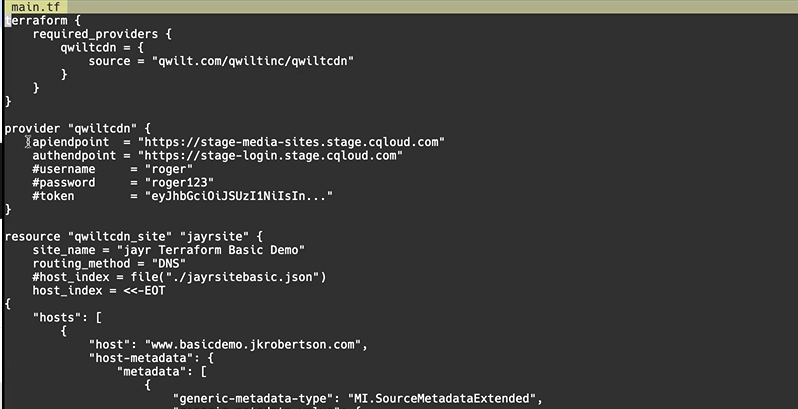
Or define these as environmental variables (in which case you have to remove the provider section from the config file.) Environmental variables were more flexible for Jay. Like this:
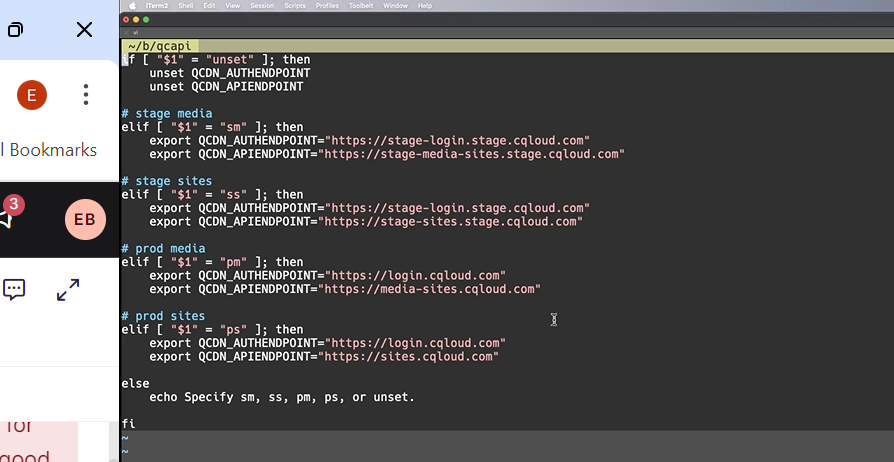
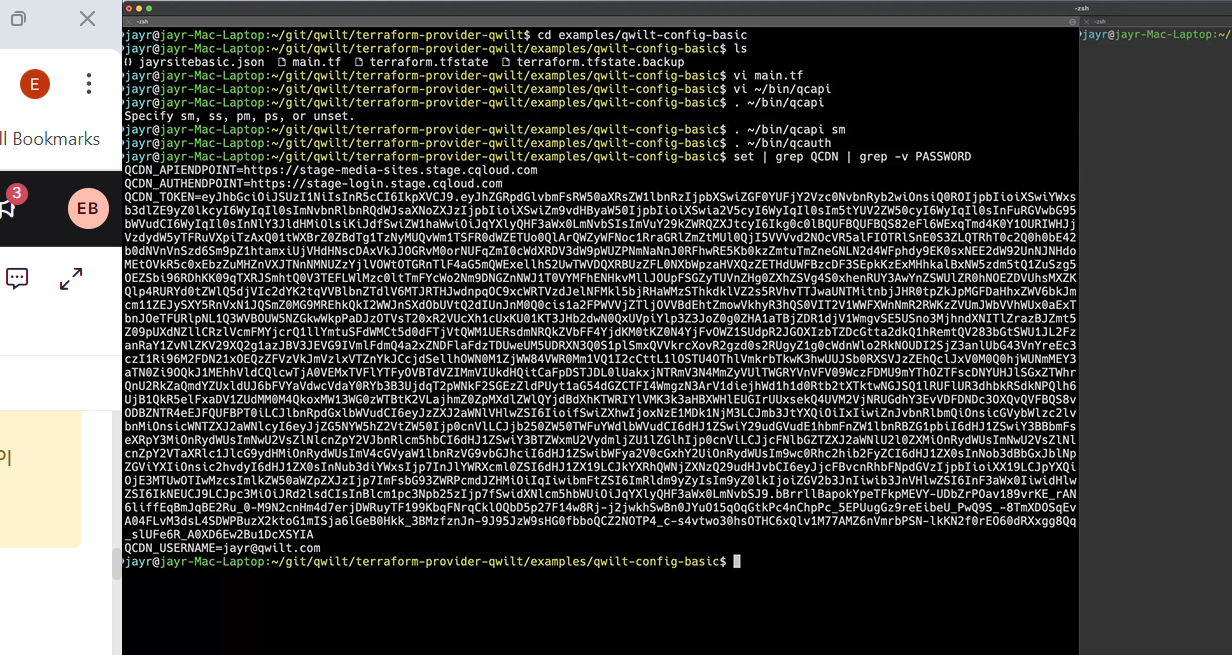
Beause he wrote a script to enable switching between Sites/Media/Staging/Production environments, and setting authenticatios as part of the environmental variables allowed him to do that.
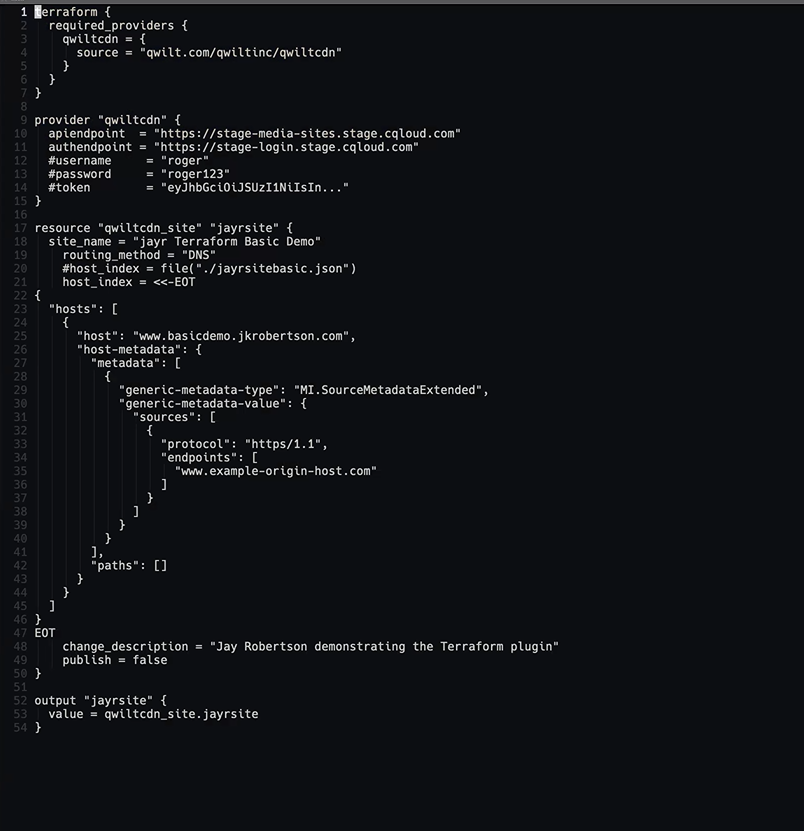
This is the demo config file:
Publish Error:

You can set variables to query different things (JAY - -is this general Terraform stuff, or something specific for Qwilt that would be useful to doucment?"):
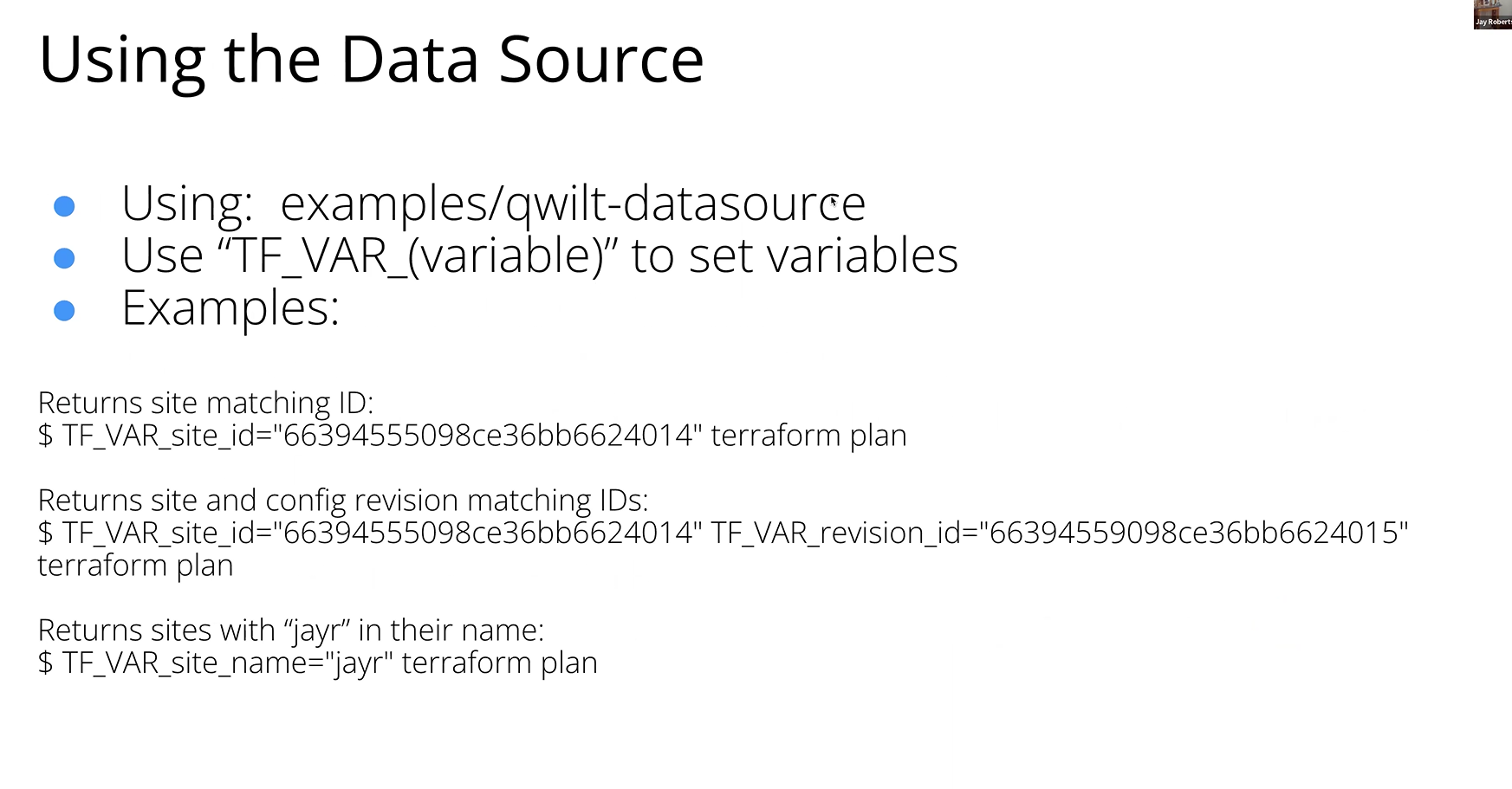
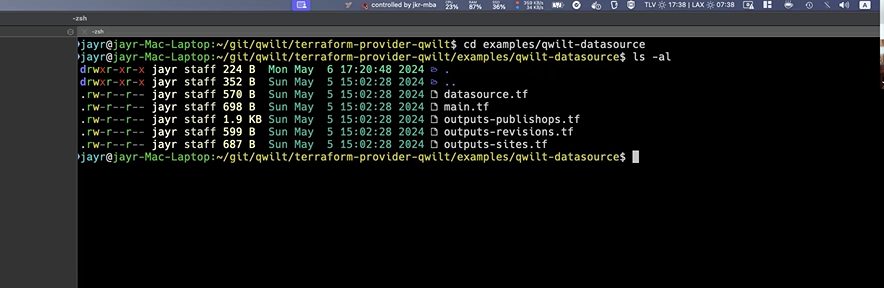
So by default, if you do a terraform plan, you'll get the full list of all the site ids and site names. It's like a list command.
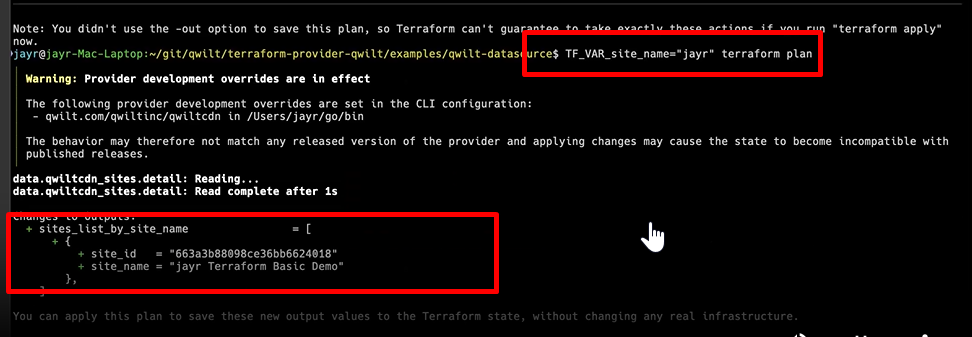
But even if I don't know my site ID, I can still use the site name or a part of it as a variable for the terraform plan command, like this:

Then the response gets me my site id and site name:
So now you can query for a particular site id to get the details about what's going on there:
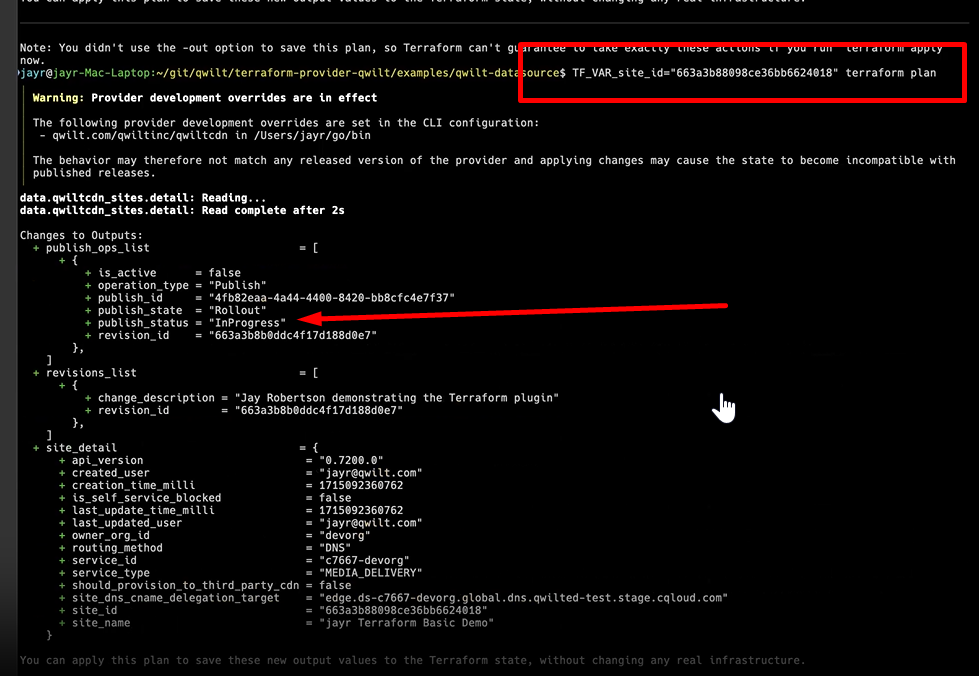
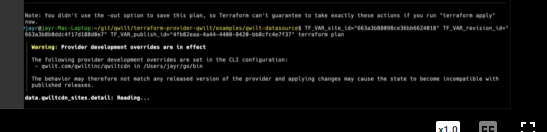
If there were multiple configurations or publishing operations, it would all be there. YOu can continue to drill down by retrieving info about a particular revision id, or publish Id and so on. (Adding the TF_Var s to the terraform plan command.) So Terraform Plan triggers a get API. Vs. Terraform Apply which is like a POST.
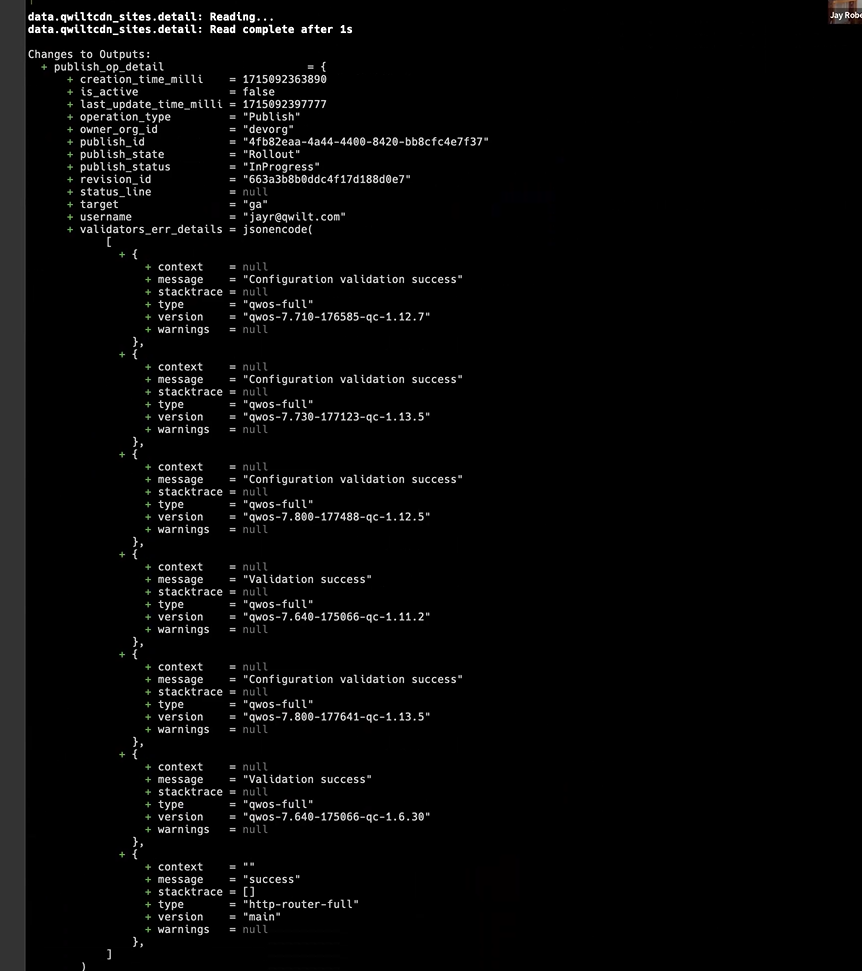
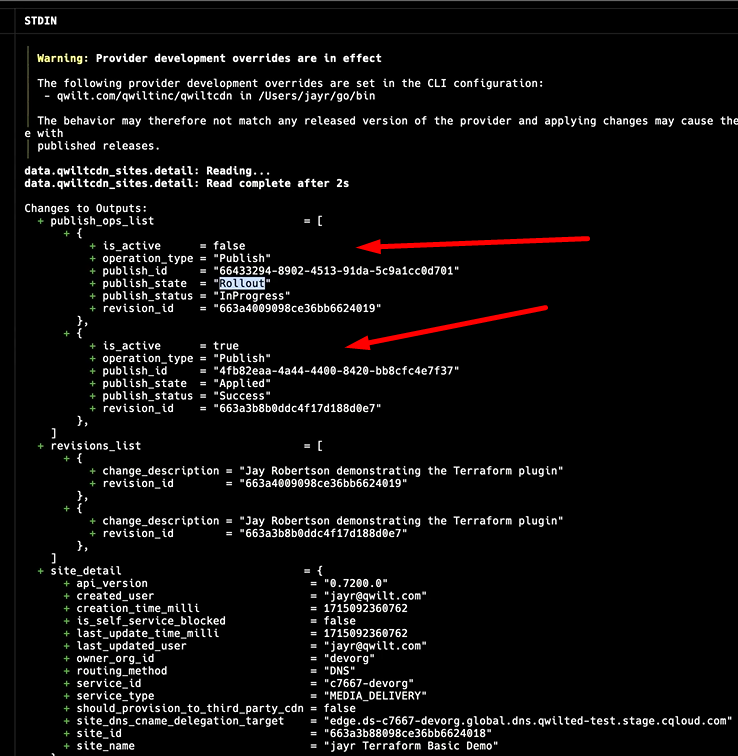
See all the publishing details:
STOPPED HERE!
Publish state in this example is Rollout. . . You can see the details in the subsequent sections, in this example, that validation has succeeded and that's where we're at. You can continue to send the same command (Terraform Plan with the same variables set) until the Publish State indicates completion. And only then publish again. Meanwhile, you can continue to work in your Terraform config file without being blocked while the publish operation is in progress.
datasource.tf:
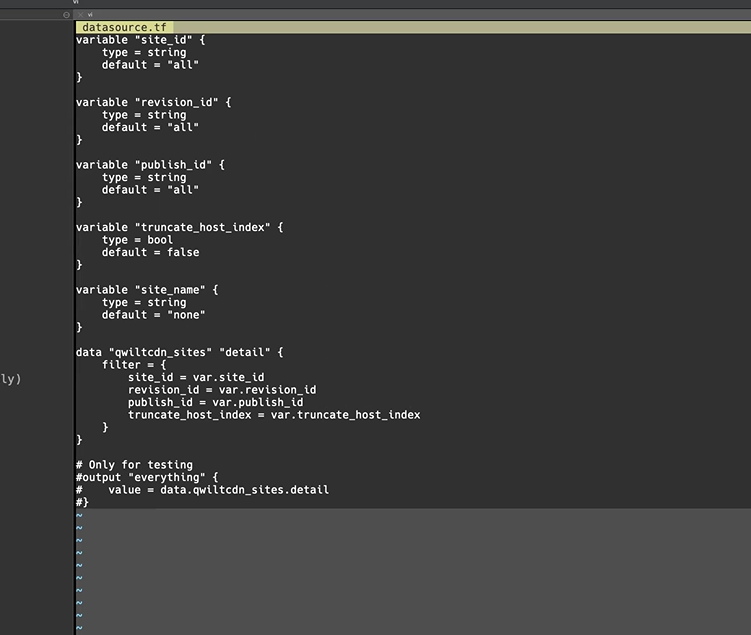
There are other data source files, too, e.g. outputs-sites.tf, each with the queries that determine what happens when you use any of the variables when getting info from any of the data sources.
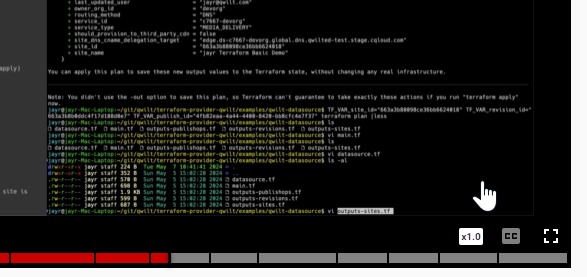
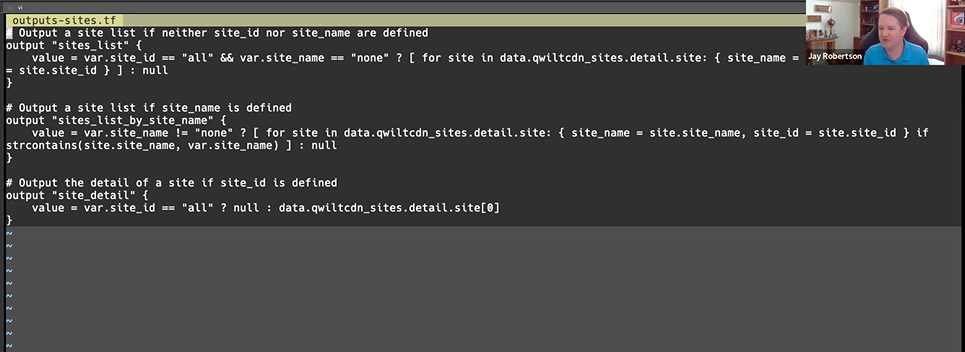
In the context of a data source, terraform apply applies the information into the local state. It takes the info and stores it locally. . . ?
resource state vs datasource state? I didn't understand this. Jay said it's cleaner to separate datasource and resource configs. But I think this is terraform stuff.
What exactly is Loading State? Is it like activating or implementing whatever is defined in your Config file? Or just generating all the e.g. IDs so that Activate will work?
All publishing operations, now there are multiple:
vi main.tf -- to view the main.tf to see my authentication info, the resource URLs, the provider e.g. the stage URL. . . etc.
vi jayrsite.tf - here, I can update the name to include e.g. Staging or whatever. All of this lets me have variations of the configuration for e.g. Prod vs. Staging.
I can templatize the json config like this:
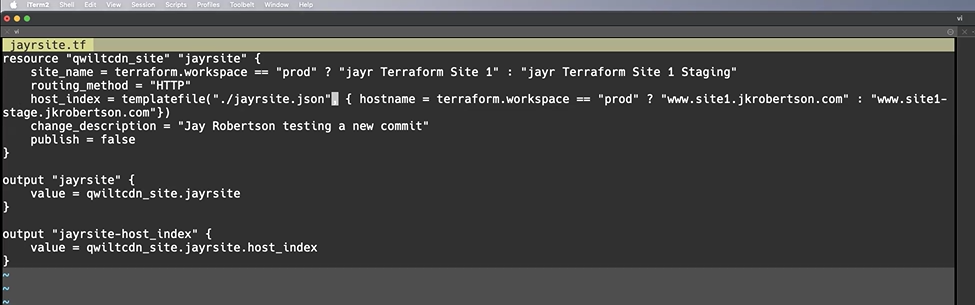
Note that I'm saving the json config as a file, "jayrsite.json"
I'm saying that some values are actually variables, that are referenced within the JSON file, e.g. hostname= terraformworkspace == "prod" ? ...
vi jayrsite.json
This is the response, and you can see that the host is a variable, that this has been templatized.
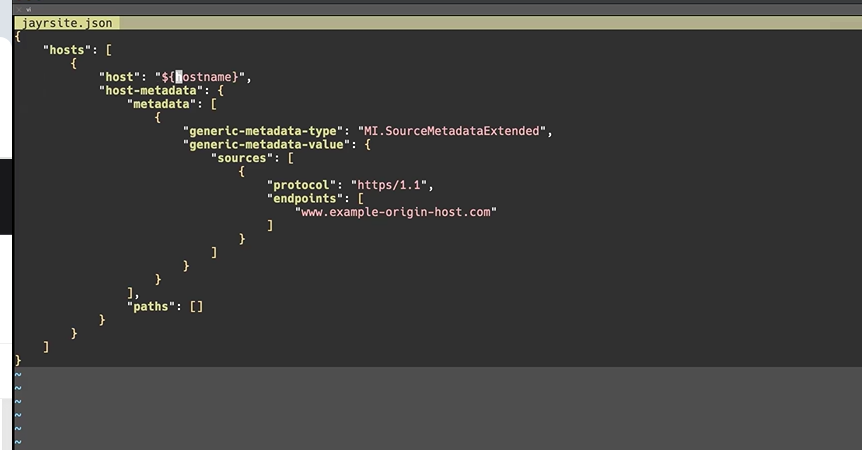
The host name will depend on if I'm in the production or staging workspace.
terraform plan, just to look at it. (terraform apply actually activates it. . . )
terraform workspace select prod
terraform plan
to see what host is being used. . .
Supports testing in Stage.
Site Targeting - like if I wanted to apply a particular update to a particular host (site?) I can do that.
Output Properly Formatted JSON Blob:
The plugin formats it a specific way.
The API "cleans up" all the formatting. But Terraform then recognizes it as a new config. So the first time a customer makes changes, they have to reformat to the required format and store it locally like that.
How to do that: Configure an output that will generate the formatted host index. Like this:
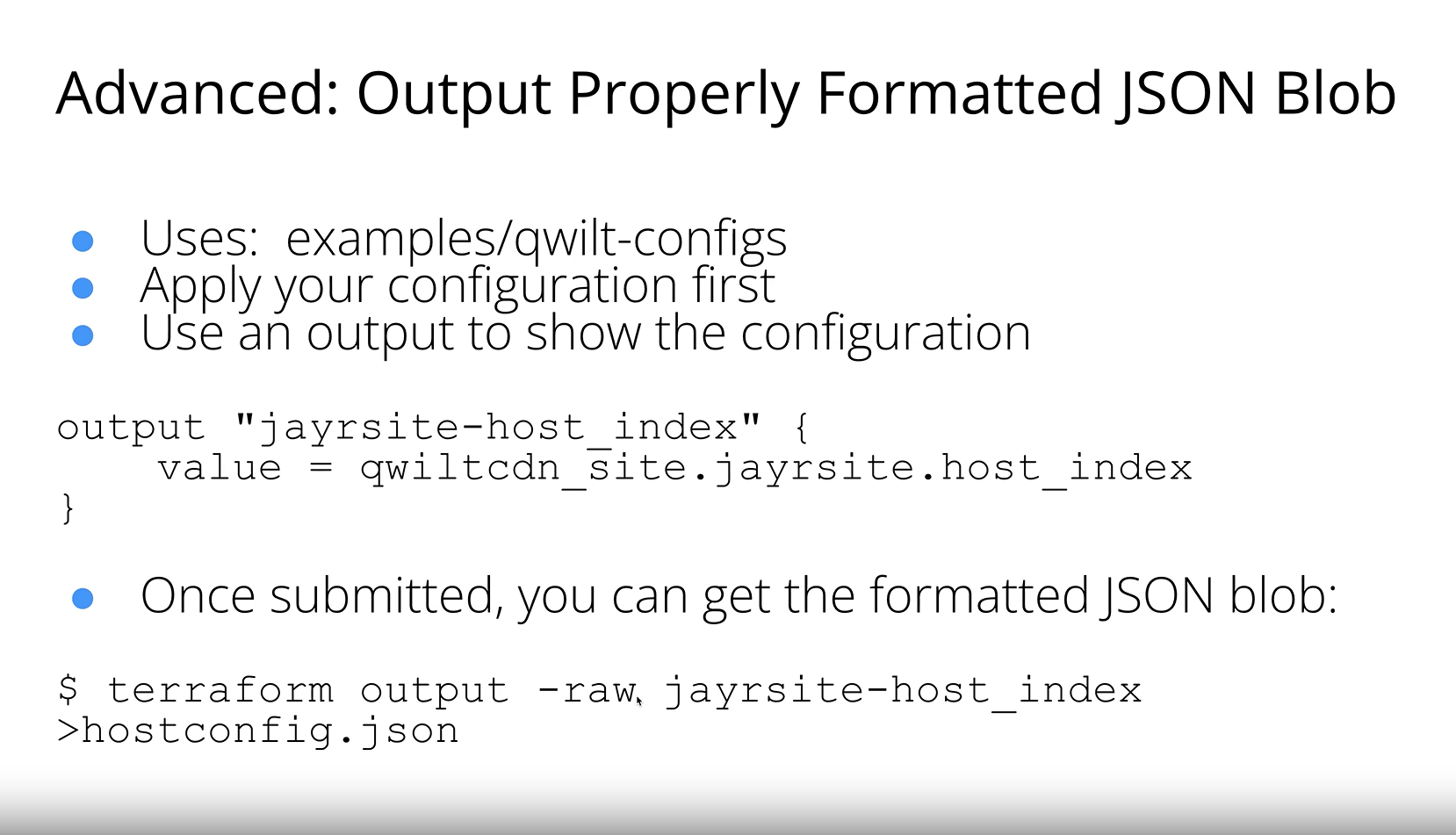
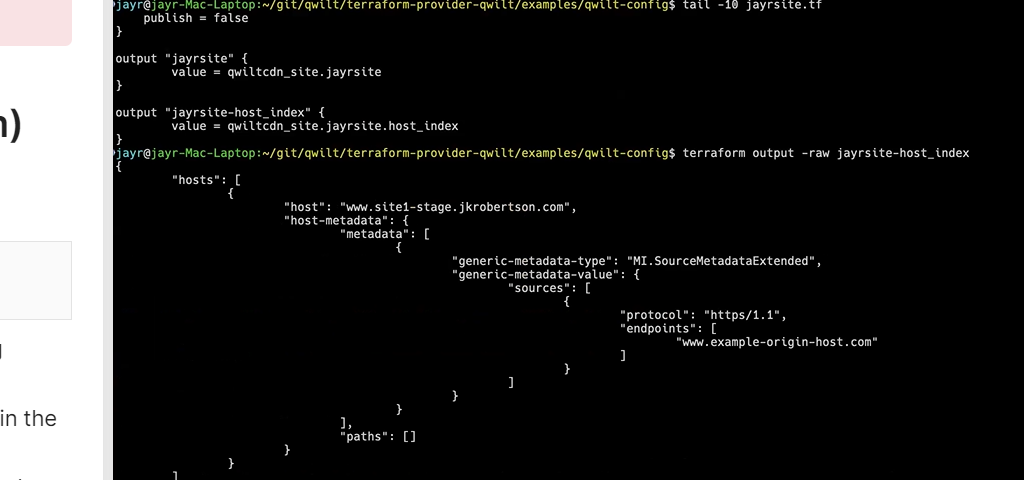
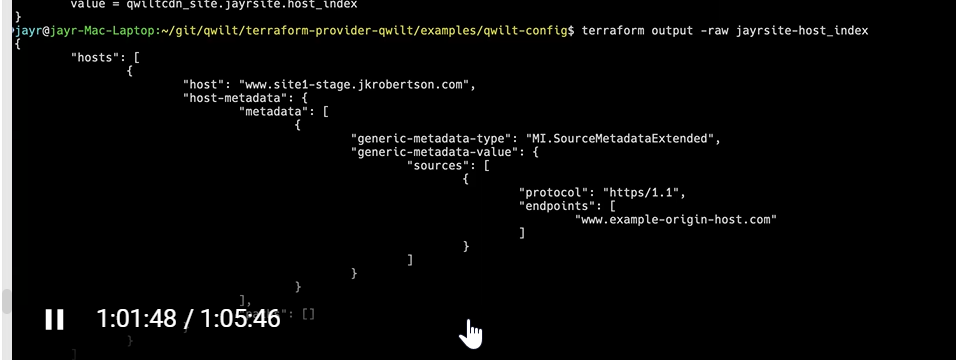
That creates a stored config. So from now on when I do a terraform apply and use the stored config, the formatting is preserved. This will be the hardest thing for customers to grasp so this is important to document. So that every apply doesn't create a new config.
:::
:::(Info) (Focus of Documentation)
Focus of documentation - link to auto gen docs that I've edited in source, limitations e.g. Publish; describe the host index.
:::
:::(Warning) (For me to implement)
Update the MD site configuration overviews and etc. in the KB and API docs, to include the Terraform option.
Make sure the examples in the auto generated docs are generic.
:::
ALSO STOPPED HERE:
Workflow
Prerequisites:
- (Install Terraform.)
- Download the Qwilt Terraform plugin? Install it?
- Prepare the site configuration JSON.{target=_blank} Maybe this doesn't belong in the API documentation anymore. If it's common to both Terraform and API, it should be moved to the KB and referenced.
- Prepare the configuration (.tf) file. See Supported Resources. (Is there anything we need to explicitly explain about the config file or is it enough to describe each of the supported resources? Should we provide a copyable example?) What, besides "resources" goes in this file?
Terraform State file represents the configuration. . . Terraform does not always refresh the data in the backend. Only when you "refresh" or change something and "apply."
- Create the site in the UI.
- If you deploy (publish) from
- Site object+ site configuration is created in the UI the first time I save. (Site name needs to remain unique. Same site name + Terraform.)
- (Double check about configuration.) Revision ID. If I publish from the UI, then I can't use the same domain from Terraform. Domain must be unique. (Verify.)
- Site activation = publish and link certificate (API/UI actions.)
- Terraform Import - per resource. Or Create Terraform production site from scratch. Then rename it to Terraform. . .
Invoke the Terraform Configuration
1. Open the command line interface (CLI) and navigate to the directory containing the configuration file/s. Do they have to be where the terraform installation is? No.
cd path/to/your/terraform/configuration
2. ???Initialize the working directory. terraform init
3. ???Optionally, validate the Terraform configuration. terraform validate
4. ???Create the execution plan? (Do we provide the execution plan? Do they have to invoke it somehow?) terraform plan
5. Apply the configuration (to create or update the site). terraform apply OR terraform apply planfile because probably the planfile is part of the Qwilt plugin?
6. Review and confirm the changes. yes to confirm.
Prepare the Config File
Example:
The order of resources is fixed. Pay attention to dependencies.
terraform {
   required_providers {
      qwiltcdn = {
         source = "qwilt.com/qwiltinc/qwilt"
      }
   }
}

provider "qwiltcdn" {
   username     = var.username
   password     = var.password
   #token        = "eyJhbGciOiJSUzI1NiIsIn..."
   env_type = var.selected_env
}

resource "qwiltcdn_certificate" "cert1" {
   certificate = filebase64("./domain2.crt")
   certificate_chain = filebase64("./domain2.crt")
   private_key = filebase64("./domain2.key")
   #email = "myemail@acme.com"
   description = "Certificate description."
}

resource "qwiltcdn_site" "examplesite" {
   site_name = "My Example Site"
    routing_method = "DNS"
}

resource "qwiltcdn_site_configuration" "examplesite" {
   site_id = qwiltcdn_site.examplesite.site_id
   host_index = <<-EOT
{
   "hosts": [
      {
         "host": "www.mysite.com",
         "host-metadata": {
            "metadata": [
               {
                  "generic-metadata-type": "MI.SourceMetadataExtended",
                  "generic-metadata-value": {
                     "sources": [
                        {
                           "protocol": "https/1.1",
                           "endpoints": [
                              "www.example-origin-host1.com"
                           ]
                        }
                     ]
                  }
               }
            ],
            "paths": []
         }
      }
   ]
}
EOT
   change_description = "This is an example of a basic site."
}

resource "qwiltcdn_site_activation" "examplesite_ga" {
   site_id = qwiltcdn_site.examplesite.site_id
   revision_id = qwiltcdn_site_configuration.examplesite.revision_id
   certificate_id = qwiltcdn_certificate.cert1.cert_id
}
What's the EOT above change description?
Supported Resources
Does order matter?
Does each site always have a single configuration file? If a customer has multiple sites, does each have a dedicated configuration file?
See if it makes sense to configure each section like this: https://registry.terraform.io/providers/fastly/fastly/latest/docs/resources/alert. Probably won't have time to go into the schema for R1. Drill down on it when I get back.
Per resource, organize like this?
Overview
Example
Input variables (name, description, type, default if relevant, mandatory?)
Output (name, description)
Import
Or: Example, Import, Schema, like with Fastly.
qwiltcdn_certificate (Certificate Management)
qwiltcdn_certificate
Certificate Assignment is different from the API cert mgt. Find out in what way.
resource "qwiltcdn_certificate" "cert1" {
   certificate = filebase64("./domain2.crt")
   certificate_chain = filebase64("./domain2.crt")
   private_key = filebase64("./domain2.key")
   #email = "myemail@acme.com"
   description = "Certificate description."
}
Single certificate only? If a customer wants different certs for different hosts, what do we recommend? Using the API? I understand that using the UI is not an option once they're using Terraform. Is the same true for using the API? Once you're using Terraform you can't really use the API anymore for Cert Mgt and/or updating the site configuration? So is single certificate just a limitation, period? And if they want different certs for different hosts, then they have to configure multiple sites, one for each host/group of hosts using a particular certificate?
qwiltcdn_site (Site Management)
resource "qwiltcdn_site" "examplesite" {
   site_name = "My Example Site"
    routing_method = "DNS"
}
Is it possible to change the routing_method once you've published? You have to d efine the routing method explicitly. Mention that if you change the routing_method, it triggers a replace. The entire site is deleted and then replaced. It's unlikely that a user will want to do this.
Name is user defined?
Routing method, DNS or HTTP?
Site Configuration (Site Configuration Management)
qwiltcdn_siteconfiguration
Please explain the difference between a site configuration and a site configuration version. I don't have this concept in the UI/API. It's just one config per site, with multiple versions. So here, I can create distinct named configurations? What does that mean? Is it like multiple sites, each with distinct hosts? Why would I do that?
The E0T format is required. - Describe what that means.
resource "qwiltcdn_siteconfiguration" "demo1" {
  site_id = qwiltcdn_site.demo.site_id
  host_index = ...
}

resource "qwiltcdn_site_configuration" "examplesite" {
   site_id = qwiltcdn_site.examplesite.site_id
   host_index = <<-EOT
{
   "hosts": [
      {
         "host": "www.mysite.com",
         "host-metadata": {
            "metadata": [
               {
                  "generic-metadata-type": "MI.SourceMetadataExtended",
                  "generic-metadata-value": {
                     "sources": [
                        {
                           "protocol": "https/1.1",
                           "endpoints": [
                              "www.example-origin-host1.com"
                           ]
                        }
                     ]
                  }
               }
            ],
            "paths": []
         }
      }
   ]
}
EOT
   change_description = "This is an example of a basic site."
}
Is the site_id value automatically added to the configuration? It's like a series of automated steps, so the site_id value is generated by the Site function and then automatically applied here? Or do I have to retrieve it somehow and explicitly set the value here?
Do I just copy/paste the JSON format to the host_index field? Is the JSON format what's required or another format? Would it be possible to link to a file instead? Are all the SVTA objects currently supported by the UI and API also supported for Terraform? Anything to keep in mind?
Site GA Activation (Publishing/Unpublish a Site Configuration)
resource qwiltcdn_site_ga_activation
I don't see that the activation resource specifies a particular siteconfiguration. So I don't see that it's possible to create a new configuration for updates you don't want to publish yet and that doesn't even make sense really. . . because. . . you'll want to update the existing site and not swap it. . . Or am I missing something?
Efrat-- please show me how to publish to a specified e.g. prestaging env. for my own use.
Use this resource to publish to production.
:::(Info) (Important Note: )
Drill down on this. What actually happens/what response do I see on Publish, even though it's probably still in progress. . . and does it make sense to direct them to the Publishing Operations APIs for checking status? Also, is the Cancel a Publishing Operation API useful? Would triggering it from the API override the Publish operation triggered by Terraform?
You'll get a quick confirmation of publish response in the CLI, even though the publishing operation itself is not 100% complete. If you try to publish another update before the last publishing operaiton is 100% complete, you'll get an error message.
:::
:::(Info) (Note)
Each activation command creates an immutable site configuration version. To unpublish, remove the relevant siteconfiguration resource from the Terraform configuration file and trigger activation. To roll back, roll back in your source code and then trigger an activation command. It's always the latest version from your source code that will be published.
:::
resource qwiltcdn_site_ga_activation "ga" {
site_id = qwiltcdn_site.demo.site_id
    revision_id = qwiltcdn_configuration.demo1.revision_id
certificate = qwiltcdn_certificate.cert1.cert_id
#csr = qwiltcdn_csr.csr1.csr_id
 }
Is this example missing the publish_status field?
- Is the "site_id" automatically populated? The revision_id is always the latest in your code source. If you want to control that, you'll have to roll back to the specified site revision in your source code. Show me what that looks like. What/where is the site revision object in the Terraform use-case?
- Is the "certificate" value automatically populated?
- Remove "#csr" from the example?
Site CP-Staging Activation - Is this supported/relevant to customers?
Use this resource to publish to staging.For example, to test new certificates when the current one is about to expire. (Certificates are activated on Publish.)
resource "qwiltcdn_site_activation" "examplesite_ga" {
   site_id = qwiltcdn_site.examplesite.site_id
   revision_id = qwiltcdn_site_configuration.examplesite.revision_id
   certificate_id = qwiltcdn_certificate.cert1.cert_id
}
Version Management
To unpublish a version, removed the named site configuration (e.g. resource "qwiltcdn_siteconfiguration" "demo1" ) and then activate the site. It unpublishes the site configuration. (Does it roll back to the previous version or does it unpublish it all together?)
## Migrate an Existing Site to Terraform
'terraform import' lets you bring resources created outside of Terraform under its management.
terraform import aws_instance.example i-1234567890abcdef0
Document how I get Terraform to recognize my already existing resources. Again, this is a one-time thing? Terraform takes the existing resource at a point in time and from then on, any work done in UI or in Terraform is divergent? So if I make and publish changes from the UI, they'll overwrite any work done in Terraform and vice versa?
:::(Error) ()
Per site:
- Point to the relevant resources by creating a Terraform resource configuration file.
- Use the UI or API to retrive the relevant resource IDs?
- terraform import
- Confirm the state matches the resource configuration. (?) (From Jay Slack notes.)
:::
Sync Changes from Other (Not Terraform) Sources
(From Jay Slack)
terraform planto see what changes would be undone by my existing (Terraform?) configuration.- Make the updates manually to the local (Terraform?) config. (Meaning in the Host Index?)
-
Repeat step one to confirm there are no difs. If needed, continue manual updates until there are no more difs.
FOR MY GENERAL KNOWLEDGE
:::(Info) (For my general knowledge)
Terraform Plan shows you what changes will be made before applying them.
Terraform Apply makes the changes.
Terraform plugin has two parts:
- Provider plug-in with resources and data sources (resource is to configure, data source is to view)
- Go-based CDN API wrapper. - This is how we implemented the plugin. It's transparent to users.
No, Terraform does not have an "activate" command. The primary commands used to manage infrastructure with Terraform are:
terraform init: Initializes a working directory containing Terraform configuration files.terraform plan: Creates an execution plan, showing what actions Terraform will take to achieve the desired state.- terraform show: Dsplays the state or a plan file in a human-readable format. Used to understand the current state of your infrastructure or for reviewing the details of a plan before applying it.
terraform apply: Executes the actions proposed in the Terraform plan to achieve the desired state.terraform destroy: Destroys the infrastructure managed by Terraform, reverting all changes.
These commands cover the lifecycle of managing infrastructure with Terraform.
$terraform workspace new prod - creates a new workspace, "prod"
terraform workspace select prod (is like a change directory). Then subsequent commands are applied to that workspace. Or e.g. terraform workspace select stage.
A terraform user can organize their files however they want. When you plan or apply, terraform automatically concatenates all the info from all the .tf files. Apply actually does plan first and then prompts you to Yes/No. So just refer to it as the configuration file. There seems to be at least a convention to have one file called main.tf. You can have additional files. . .
Normally the data sources are in one configuration file and the resources are in another and it's good practice to keep them in separate directories. So authentication info would need to be in both places. So maybe define them as environmental variables. Two types of variables - 2 env variables we want to expose currently: user name, pwd;
Import brings the data locally. All the work you do is locally. Then apply pushes what you have locally to the backend (to production).
You should create the data source config file in one directory, and the resources config file in another dirrectory. So that you can apply for e.g. data sources to renew the login credentials without actually pushing anything of the resources to production. Include the username/pwd params in both config files, so that every time you terraform apply, it triggers the Login API. Terraform apply from the directory where (only) my data sources are. To renew the authentication token.
:::
## Supported Resources
Like Post Commands
Resources allow configuring the combination of Sites, Site Configurations, and Publishing operayion in a declaritive configuration.
Certificates - upload, delete, update, associate, unlink
Sites - create, update delete.
Site Configuration (revision) - add
Publish - publish, unpublish
Supported Data Sources
The Terraform provider for the data source provides a lot of information about the API. You can then set variables to pinpoint more specific data.
Data Sources allow retrieving the details of Sites, Site Configuration versions (revisions), and publishing operations.
By default, all sites, configuraitons, and publishing operations are returned. But you can set up filters to specify siteId, revisionId, and or publishId.
Certificates - list, get
Sites - list certificates associated with a site - currently only one is supported?, list certificates uploaded by your org, get.
SiteVersions - get list of config versions for a specified site.
Publish - status of a specified publishing operation, history of pub ops for a specified site
truncate_host_index = var.truncate_host_index -- presumably all this detail will be in the referenced doc.