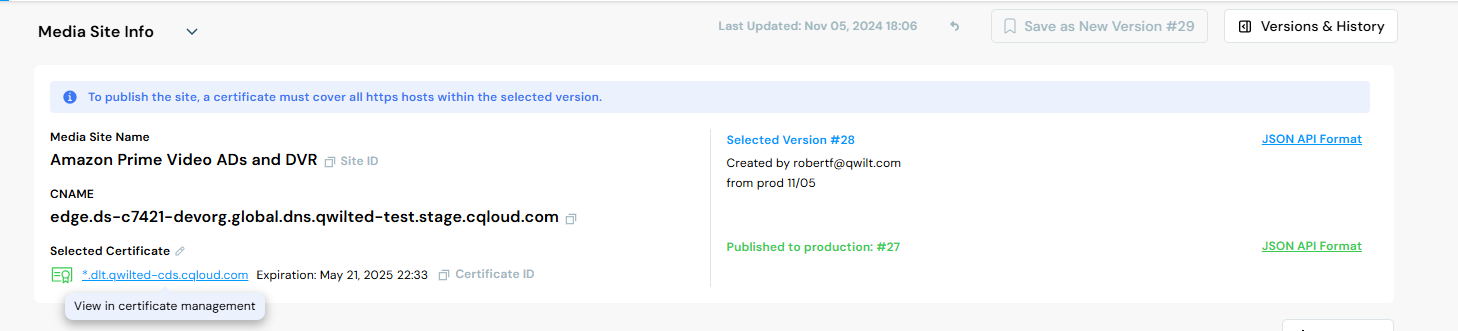
Draft overview for copy paste
SSL certificates are used for secured communication between the CDN and clients.
=========================================
This belongs in the articles that describe the step-by-step procedure for creating a new certificate or template. (Upload cert, create template.)
Only one certificate may be associated with a site. So if a site configuration includes multiple hosts, ensure that the certificate includes all the hostnames.
======================
Upload a Certificate
Upload a Certificate + Chain + Key OR
Upload a Certificate + Chain + csrId.
Link to UI doc that explains how to link to a certificate to a site.
Set Expiry Alert
Include all the certificate management functions (list, update, delete. . . )
Me-- take a close look at what happens after uploading a certificate with the Template ID. Does it appear on a separate tab? Is the way you link to it the same as how you link to a directly uploaded certificate? And etc.
Once a template is linked, do we still have to republish a site when a new certificate is created ?
Create a Template
Once a certificate is linked to a site in production, is the point of the template to be like a holder for the private key and to associate the private key with the certificate?
Qwilt Managed Workflow
A template includes the details needed to create the certificate (common name, SAN, country, locality, org name.)
Assumes customer agrees to working with the Let's Encrypt CA.
Templates are stored in your org's space like certificates are, and they are linked to sites like certificates are.
- Create a certificate template. (metadata that describes the cert. Make sure it covers all the hosts of the intended site. (Response includes a Template ID and a CSR ID.)
- Export the List (challenge/mitigate challenge).
- Then Qwilt willl manage the CSR lifecycle from CSR to renewal.
- Customer must link template to a site or sites. Qwilt just manages certificate requests and renewals. Independent of the site config that links the template (and the associated certificate) to the site. The nice thing is that when a certificate is renewed (in effect it's a new certificate) by virtue of the fact that the link is to the template and not to a certificate, you don't have to relink ever. Unless you want to link to a different template and its associated certificate.
Configuring a CNAME Record for Domain Verification
To enable Qwilt to manage your certificates, you need to link your domains' verification process to Qwilt. This allows Qwilt to verify domain ownership when requesting certificates from the Certificates Authority (CA). (by responding to the ACME challenge on your behalf. This is essential for automatic certificate issuance and renewal.)
To do so, you create a CNAME record that will allow Qwilt to pass the necessary verification steps with the CA.
We recommend setting the TTL to a max of 1 day. The CNAME record should remain in place as long as you want Qwilt to manage or renew the certificate. If the record is deleted, Qwilt won't be able to verify domain ownership again, which is necessary for ongoing certificate renewal.
When you’re working with a Certificate Authority (CA) to get a certificate, the CA needs to confirm that you truly own the domain in question. Since Qwilt is handling certificate requests on behalf of its customers, it’s responsible for completing this verification process with the CA.
Here’s why the CNAME record is essential:
-
Qwilt’s Role as an Intermediary: Qwilt communicates with the CA on your behalf to request, manage, and renew certificates. The CA requires proof that Qwilt, as your representative, has control over the domain to issue or renew a certificate.
-
The Purpose of the CNAME Record: The CNAME record in your domain’s DNS settings acts as this proof. By creating it, you show the CA that you approve of Qwilt’s request, since only someone with control over the domain could create this record.
-
Ongoing Verification: As long as this CNAME record remains active, Qwilt can continue to work with the CA to renew the certificate as needed. If the record is removed, the CA will no longer recognize Qwilt’s authority over the domain, blocking further renewals.
In summary, the CNAME record is like a key that authorizes Qwilt to manage certificates with the CA on your behalf, ensuring you don’t need to manually handle each renewal.
Qwilt will now manage all aspects of the certificate lifecycle, including issuance and renewal.
However, for Qwilt to be able to do so, they must be able to verifiy domain ownership.
That Table that they can Export (How to do that with the API?)
From: _acme-challenge..example.com – This is the alias name you need to use for the CNAME record. In this case, it’s using the format required for ACME challenges (often used for domain validation in certificate issuance). Replace .example.com with your actual domain name.
To: 0000130.acme-challenges.stage.qcloud.com – This is the target domain for the CNAME record. It points to Qwilt’s server, which will handle the ACME challenge for domain ownership verification.
Create a CNAME Record: In your domain’s DNS settings, create a new CNAME record with the provided values:
Name/Alias: _acme-challenge..com
Value/Target: 0000130.acme-challenges.stage.qcloud.com
TTL Setting: Set the TTL to a maximum of 1 day, as recommended.
This CNAME record tells the Certificate Authority that Qwilt has permission to manage the certificate for your domain by verifying the ACME challenge. If the record is removed, Qwilt will no longer be able to renew the certificate automatically.
Self Managed Workflow
You can use any CA. When you get the signed certificate, upload it to Qwilt. You are responsible for managing updates and expirations and etc. For the entire and ongoing CSR lifecycle. (Cert mgt lifecycle or CSR lifecycle? Which is accurate?)
* Create Template
* Create a Signing Request(?) Uses the templateID, but also seems to require defining a lot of stuff already defined by the template. . .
* Pem encode the signing request.
* (In the UI, Generate and Download CSR creates the PEM encoded CSR.)
* Send the request to the CA of your choice.
* Upload the signed certificate to the CDN. (Via the Templates Tab.)
* Link it to a site.
* Republish the site? Check if this is still a requirement. What about that new Sites API RepublishedResources attribute? Is it relevant to Certificates in addition to Keys?
* Subsequently, you'll be responsible for renewing and etc. (and uploading?)
Certificate and Template Management
Delete a Template
Deleting a template will result in the deletion of the related CSR. Any certificate created from the CSR will become unusable, as it no longer has a linked private key. (Figure out exactly what we mean by this?)(I think create template creates the private key. So if you delete the template, you delete the key.)
Link a Certificate/Template to Your Site
I don't see any way to link the template via the UI.
Before:
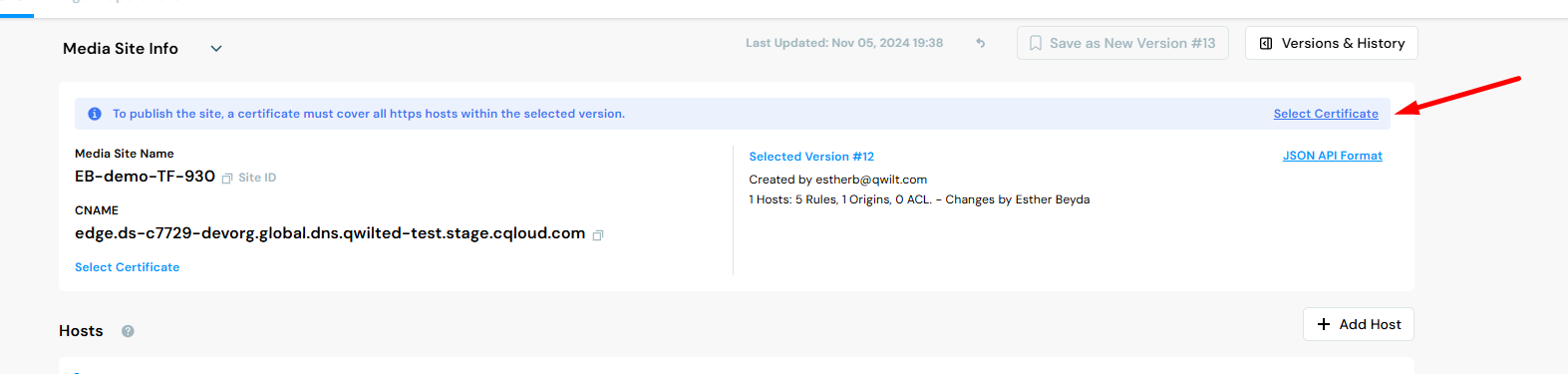
After: