
Upload a certificate and secret key
The Certificate Manager supports uploading an existing certificate, chain, and private key directly to the CDN.
:::(Info) (Note:)
Only one certificate can be linked to a site, so ensure that the certificate covers all the site hosts that are configured for secured traffic.
:::
To upload a certificate:
1. Login to QC Services{target=_blank}.
2. Open Media Delivery and navigate to Certificate Management.
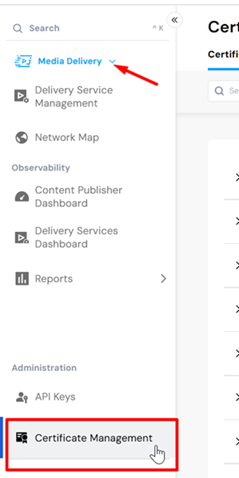
- In the Certificate Management page, select Add Certificate.
- In the Add Certificate dialog, select Upload Certificate.
- Populate the fields in the Upload Certificate dialog:
- Certificate: Import or paste the certificate.
- Chain: Import or paste both the certificate and the certificate chain in this field. This is critical for proper validation.
- Private Key: Import or paste the private key. - Select Upload.
Link a certificate to a site{target=_blank}.