
Add an acl
Use access control lists (ACLs) to limit access to your site based on a client's IP address, geographic location, autonomous system number (ASN), or use of anonymizer. You can define ACLs at both the host and path levels. Host ACL settings are inherited by paths, unless a path has its own ACL settings. In that case, path ACL settings override the host ACL settings.
When defining an ACL, you consider whether the host or path Default Access setting is Allow All or Deny All. Then you define the ACL rules that specify the exceptions. For example, if the Default Access setting is Allow All, the ACL rules specify which IP addresses to deny. If the Default Access setting is Deny All, the ACL rules specify which IP addresses to allow.
Per host or path, you may define multiple ACLs. Each ACL may define one or more rules. You have full flexibility.
Understanding Rule and ACL Order
When a host or path defines multiple ACLs. Each ACL appears in a numbered list in the ACL tab of the Host Configuration or Path Rules area. When an ACL defines multiple rules, the rules appear in a numbered list as well.
.png)
The CDN evaluates each request against each ACL and ACL rule in the order in which they appear in the list, until a match occurs. Once a match occurs, the CDN stops the evaluation without continuing to the end of the list. As soon as a request matches a condition that would cause it to be denied, the CDN denies it. As soon as a request matches a condition that causes it to be accepted, the CDN accepts it.
If the CDN has evaluated all the ACLs and ACL rules in the list and the request has still not been allowed or denied, then the default access setting defined for the Host or the Path are applied.
Example with Multiple ACLs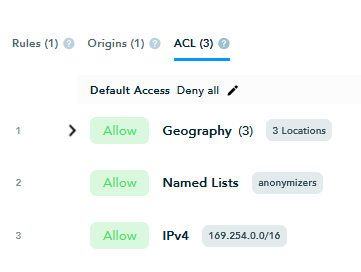
In this example, there are three ACLs and a default of "Deny all". This is what will happen in production when a request for content in this path is received:
The CDN compares the request with ACL 1, which is set to Allow IP addresses from three specific countries.
If the request comes from one of those countries it is accepted and the process is complete.
If the request does not come from any of the three countries, the CDN evaluates the next ACL in the list.
The second ACL defines a named list.
If the request matches an address on the list, it is accepted.
If not, the system evaluates the next ACL in the list.
The third ACL defines an IPv4 block.
If the request is in the block allowed by ACL 3, the request is accepted.
If not, the system applies the "Deny all" default access setting and denies the request.
Add an ACL
You can add an ACL to a host or a path.
To add an ACL:
Navigate to the My Media Sites page and select the site.
In the Media Site Configuration page, select a host.
Add the ACL.
To add an ACL at the host level, scroll to the Host Configuration area and select Add ACL.
To add an ACL at the path level, scroll to the Path Rules area, expand the relevant path, and select Add ACL.
Note: By default, the Host or Path Default Access setting is automatically set to Deny All. You can change this later.
In the Add ACL dialog, select the rule type.
Allow - This rule specifies IP addresses that will be allowed access. (Assuming the default will remain Deny All.)
Deny -This rule specifies IP addresses that will be denied access. (Assuming the default will be changed to Allow All.)
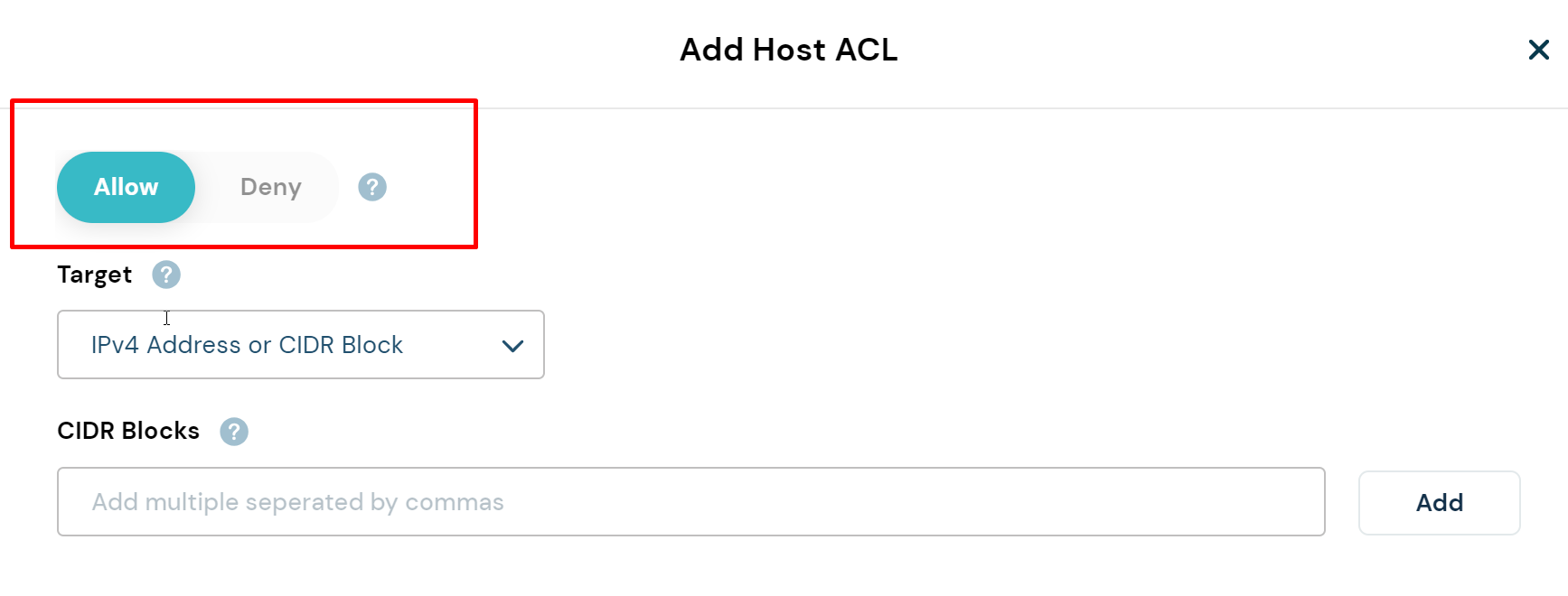
From the Target list, select a target type.
IPv4 Address or CIDR Block
Internet Protocol version 4 or CIDR Block
IPv6 Address or CIDR Block
Internet Protocol version 6 or CIDR Block
Geography
Countries to include or exclude from the list
Named Lists
Categories of users to include or exclude from the list
ASN
Autonomous system numbers (ASN)
Fill out the next field according to the following table. The field that appears depends on the selected target.
IPv4
CIDR Blocks: Enter a comma-separated list of IPv4 address blocks.
Example: 192.168.0.1/24,10.0.0.0/8,172.16.0.0/12IPv6
CIDR Blocks: enter a comma-separated list of IPv6 addresses.
Example: 2001:db8::/32,fe80::/10,2a03:2880::/32Geography
Select Countries: Click in the Select Countries field and then select countries from the dropdown.
Named Lists
Select lists: Select a named list from the dropdown.
Anonymous Users - Users who attempt to spoof user information including geography and network details, with anonymizers and VPNs.
Non Anonymous Users - Users who do not attempt to hide their geography and network details.
Local ASN - Requests originating from an IP address within a local ASN.
Non Local ASN - Requests originating from an IP address that is not within a local ASN.
ASN
ASNs: Enter a comma-separated list of ASNs.
Example: AS7922,AS15169,AS7018Select Add.
Add rules to the ACL as needed.
When the list is complete, select Save ACL to save your work and exit the dialog box.
In the Media Configuration page, under Host Configuration or Path Rules, open the ACL tab. Check and if needed, change the default access setting.
In the following example, the ACL rule specifies that IPs from a specific geographical location should be denied access. Thus the Default Access setting should probably be changed to Allow All.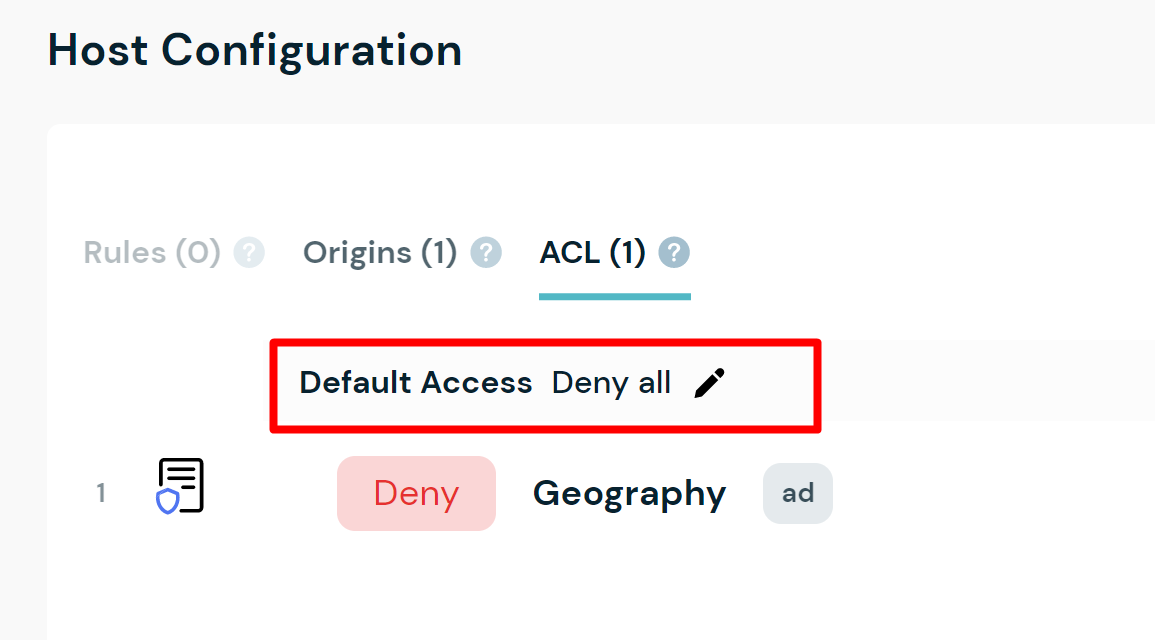
Change the Default Access Setting
As soon as you add an ACL to a host or path, the Default Access: Deny All setting is automatically added to the host or path configuration. You can change the value to Allow All, however, you cannot do that until after you've defined at least one ACL rule. After you define an ACL rule, you can edit the default access setting to the value that makes sense for your use case.
To change the default access setting:
Select the Default Access edit icon.
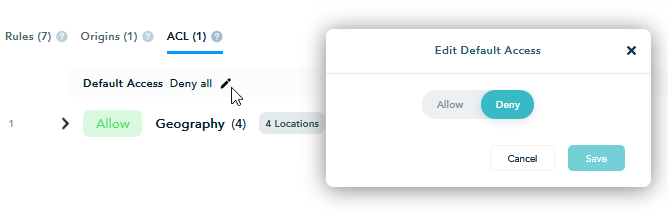
In the Edit Default Access dialog, select Allow or Deny.
Remember, if the ACL rules specify IP addresses that should be denied, then the Default Access setting should probably be Allow. If the ACL rules specify IP addresses that should be allowed, then the Default Access setting should probably be deny.Select Save.
Change the ACL Order
The CDN evaluates the ACLs in the order they are listed. For the ACLs to work the way you want them to, you must list them in the correct order.
To change the order of the ACLs, select the ACL number and drag the ACL to the position where you want it.
.png)
If an ACL defines multiple rules, you can change the rule order in the same way.
Edit an ACL
You can edit a host or path ACL.
To edit an ACL:
Navigate to the My Media Sites page and select the site.
Scroll to the Host Configuration or Path Rules area and open the ACL tab.
Select the More icon
 next to the ACL you want to edit.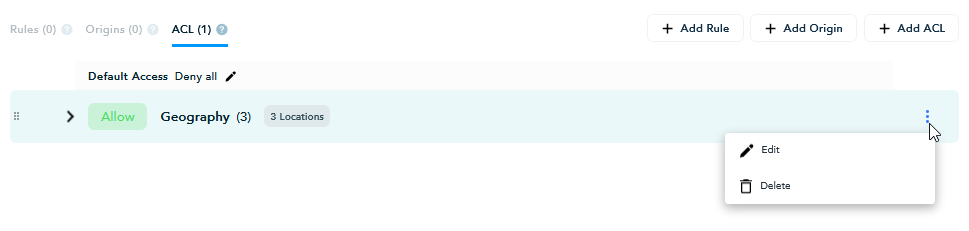
Select Edit.
In the Edit dialog, add new rules, or delete rules.
You cannot edit a rule, but you can delete it and then add a new one to replace it.Save your changes.
Delete an ACL
You can delete a host or path ACL.
To delete an ACL:
Navigate to the My Media Sites page and select the site.
Scroll to the Host Configuration or Path Rules area and open the ACL tab.
Select the More icon
next to the rule you want to delete.Select Delete.