
Purge urls
Use the Purge URL feature to purge specified content items, identified by URL.
You can execute the Purge URL operation on a selected host.
Purge Specified URLs
To purge or update content on the CDN cache:
1. On the Purge tab, select Purge Content.
2. From the Operation field, select Update or Purge.
- Purge removes specified content from the cache.
- Update invalidates specified content on the cache.
3. In the Type field, select URL.
4. In the Hostname field, select a host.
Note: If you
5. In the Path field, enter the URL you want to purge or update, relative to the hostname.
For example: */videos/movies/example/master.m3u8*
You can enter multiple URLs separated by commas.
The purge job may include up to 1000 URLs.
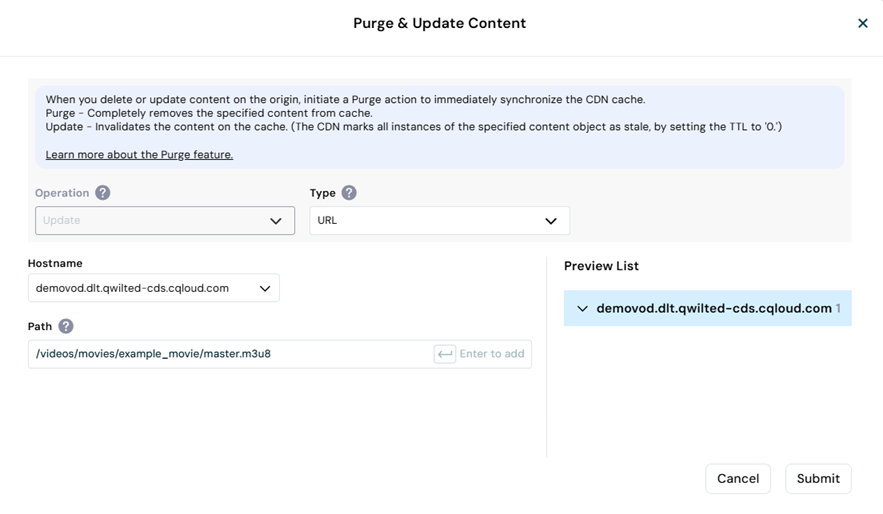
- Press Enter to add the URLs to the Preview List.
-
Select Submit.
-
Purge removes content from the CDN cache, while Update invalidates the content.
-
The purge job appears in the Purge History list, along with the status:
- In Progress - The purge job is in progress.
- Success - The purge job is successfully completed throughout the CDN.
- Failed - The purge job was not successfully completed throughout the CDN.
- Unknown - Indicates an internal error.
-